
IP Finder – IP address checker
Updated Aug 24, 2026 · v2026.8.7


See your public IPv4/IPv6, ISP and location. Test DNS leaks, ping and Wi-Fi.
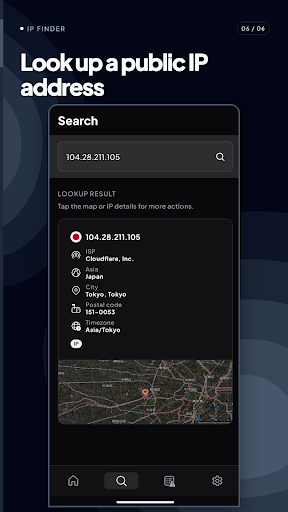
See your public IPv4 and IPv6, ISP and approximate IP-based location with IP Finder. Use the same network toolkit to check DNS leaks, measure ping, jitter and packet loss, inspect Wi-Fi and LAN details, or look up another IP address. See your public IP View public IPv4 and IPv6 information together with available ISP, country, city, region, time zone and postal-code data. Location information is estimated from the IP address, is approximate and may not match the device’s exact physical location. Look up an IP address Enter an IPv4 or IPv6 address to view available ISP and approximate geolocation details. Open the result map for geographic context and copy an address when needed. Check DNS routing Run the DNS Leak Test to see which DNS servers respond on the current connection. The result can help when checking DNS or VPN routing, but it does not by itself guarantee that a connection is private, secure or protected. Measure connection quality Run a ping test for a selected target and view latency, jitter, packet loss and a connection graph. Measurements vary with the target and current network conditions. Inspect Wi-Fi and LAN details View available local IP addresses, subnet information, DHCP server, default DNS server, Wi-Fi frequency, security type and link speed. Some fields depend on the device, Android version, permissions and network. IP Finder is a network diagnostic utility. It is not a VPN, does not hide your IP address, does not change DNS settings and does not increase network speed.
This app isn't currently appearing in any tracked top charts.