
Portainer - Docker Manager
Updated May 8, 2026 · v0.1.4


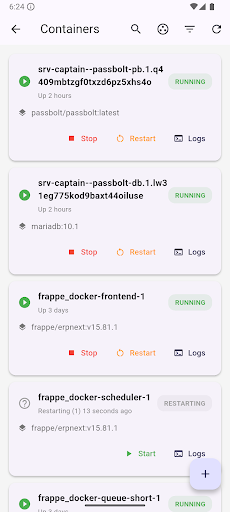




Manage Docker containers anywhere. Real-time stats, logs, and full control.
Portainer Mobile - Your Docker Command Center on the Go Take complete control of your Docker containers from anywhere with Portainer Mobile. Whether you're managing production servers, development environments, or home labs, this powerful mobile app puts full container management in your pocket. ✨ KEY FEATURES 📊 REAL-TIME MONITORING • Live CPU, Memory, Network, and Block I/O statistics • Beautiful interactive charts with historical data • Auto-refresh for up-to-the-second container status • Performance metrics at a glance 🎮 FULL CONTAINER CONTROL • Start, Stop, Restart containers instantly • Pause and Resume operations • Kill unresponsive containers • Quick actions from the container list 📝 ADVANCED LOG MANAGEMENT • Real-time log streaming • Search and filter logs • Download logs to your device • Share logs with your team • Perfect for debugging on the go 🔍 DETAILED CONTAINER INSPECTION • Complete container information • Environment variables and configurations • Network settings and port mappings • Volume mounts and storage details • Image information and metadata 🔐 SECURE & PRIVATE • API token authentication • Encrypted local storage • Direct connection to your server • No data stored on our servers • HTTPS support for secure connections 🎨 BEAUTIFUL INTERFACE • Modern Material Design • Dark and light themes • Intuitive navigation • Smooth animations • Optimized for all screen sizes ⚡ SMART FEATURES • Search containers by name or image • Group containers by image base • Pull to refresh • Swipe actions for quick control • Smart label rendering 🎯 PERFECT FOR • DevOps Engineers managing production containers • System Administrators monitoring servers • Developers testing containerized applications • Home Lab enthusiasts running self-hosted services • IT Teams needing mobile access to infrastructure • Anyone using Portainer for Docker management 🚀 WHY PORTAINER MOBILE? ✓ Manage containers from anywhere - coffee shop, commute, or couch ✓ Respond to issues instantly without opening a laptop ✓ Monitor production systems 24/7 from your phone ✓ Debug container issues with real-time logs ✓ Check performance metrics on the go ✓ Free and open-source friendly ✓ No subscription required ✓ Privacy-focused - your data stays yours 📱 REQUIREMENTS • Portainer server (CE or Business Edition) • Portainer API access token • Network access to your Portainer server • Android 6.0 (API 23) or higher 🔧 EASY SETUP 1. Install Portainer Mobile 2. Enter your Portainer server URL 3. Add your API token 4. Start managing containers! No complex configuration needed. Connect and go! 💡 USE CASES • Restart a crashed container during your morning commute • Check CPU usage while away from your desk • Download logs to share with your team • Monitor deployment progress from your phone • Quick health checks of production services • Emergency container management anywhere 🔒 PRIVACY & SECURITY Your privacy matters. We don't collect personal information, don't store your credentials on our servers, and don't access your container data. All connections are direct between your device and your Portainer server. 📞 SUPPORT & FEEDBACK We're constantly improving Portainer Mobile. Have suggestions or found a bug? Contact us at info@umegs.com
1 year on Google Play
This app isn't currently appearing in any tracked top charts.