
UsA Warp - USA125 Watch Face
Updated Oct 29, 2025 · vVARY


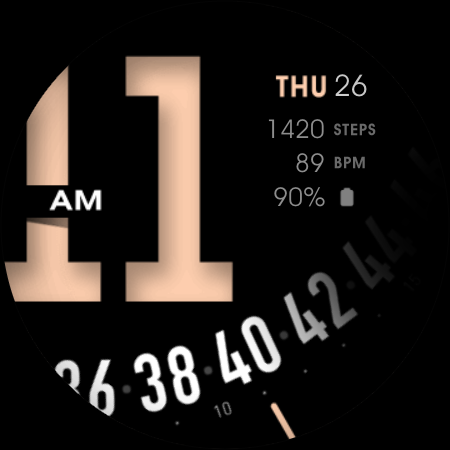
Unique and Minimal Watch Face for Wear OS Watches
Unique and minimal watch face for your Wear OS watches. This watch face requires Wear OS API 33+ (Wear OS 4 or newer). Compatible with Galaxy Watch 4/5/6/7/8 Series and newer, Pixel Watch series and other watch face with Wear OS 4 or newer. Make sure you are purchasing using the same Google account registered on your watch. The installation should begin automatically on the watch after a few moments. After the installation is completed on your watch, do these steps to open the watch face on your watch : 1. Open the watch face list on your watch (tap and hold the current watch face) 2. Scroll to the right and tap "add watch face" 3. Scroll down and find new installed watch face in the "downloaded" section For WearOS 5 or newer, you can also simply tap "set/install" on the companion app, then tap set on the watch. Data shown on the complication area may differ depend on the device and version. Features: - 12/24 hour mode - Heart Rate - Step info - 1 custom info (for weather, battery, etc) - Multiple style and color - Custom app shortcuts - Special Designed AOD, digit color synced with normal mode - AOD dim option, set the brightness of the AOD mode from the customize menu Tap and hold the watch face and go to the "customize" menu (or settings icon under the watch face) to change the styles and also manage the custom shortcut complication. To change between 12 or 24-hour mode, go to your phone date and time settings and there is an option to use 24-hour mode or 12-hour mode. The watch will sync with your new settings after a few moments. Special designed Always On Display ambient mode. Turn on the Always On Display mode on your watch settings to show a low power display on idle. Please be aware, this feature will use more batteries. Join our Telegram group for live support and discussion https://t.me/usadesignwatchface
4 years on Google Play
This app isn't currently appearing in any tracked top charts.