
Cursor for Disabled
Updated Aug 2, 2026 · v2.7.11
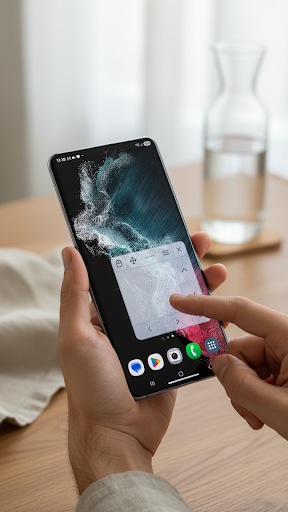


Virtual cursor and touchpad for accessible Android control.
Cursor for Disabled helps people with limited hand movement control Android more easily using a virtual cursor and on-screen touchpad. The app is designed for users who need an alternative way to tap, scroll, drag, and edit text on Android devices. Instead of reaching every part of the screen directly, you can move a cursor with a floating touchpad and perform common actions from one accessible control area. Key features: - Virtual Android cursor Move a visible cursor around the screen using an on-screen touchpad. - Floating touchpad Keep the touchpad available over other apps and position it where it is easiest to reach. - Tap and click actions Use the cursor to interact with buttons, apps, menus, and other screen elements. - Drag Mode Drag items more easily with a dedicated drag control, designed to feel closer to holding and moving with a mouse. - Scroll controls Scroll up, down, left, or right without needing precise finger movement across the whole screen. - Text Edit Mode Access text editing actions such as copy, paste, delete, enter, and cursor movement from the touchpad interface. - Adjustable cursor and movement settings Change cursor size, touchpad size, sensitivity, opacity, and movement behavior to match your comfort and device. - Minimized floating control Hide the full touchpad when you do not need it and bring it back using a small floating control. - Safety and recovery improvements Cursor for Disabled includes safety-focused behavior to reduce the risk of getting stuck with an overlay or unusable controls. Who is it for? Cursor for Disabled can be useful for people with physical disabilities, muscle weakness, limited hand mobility, tremors, fatigue, or anyone who finds direct touchscreen control difficult. It may also help caregivers, accessibility testers, and users who prefer a more PC-like cursor experience on Android. Accessibility Service usage: Cursor for Disabled uses the Android Accessibility Service API to provide its core function: controlling Android through a virtual cursor, touchpad, gestures, scrolling, and text-edit actions selected by the user. The Accessibility Service is required for the app to perform touch actions on behalf of the user. The app is designed for accessibility support and should only be enabled if you want to use these cursor and touchpad controls. Cursor for Disabled focuses on simple, practical, and reliable Android control for people who need an easier way to interact with their phone or tablet.
0 years on Google Play
This app isn't currently appearing in any tracked top charts.