
Volume Stylish Panel: Custom
Updated Feb 11, 2026 · v1.13

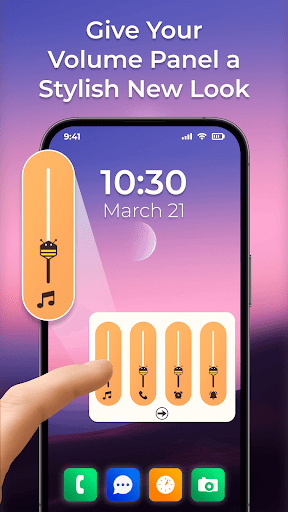


Customize your volume panel with RGB themes, neon styles & unique sliders.
Transform Your Phone's Look with the Ultimate Custom Volume Panel! 🎚️✨ Are you bored with the plain, default system volume control on your phone? It’s time to upgrade! Volume Stylish Panel allows you to completely replace your old volume keys with a modern, fully customizable, and aesthetically stunning volume operator. Whether you want a sleek iOS style, a vibrant RGB neon look, or a minimal dark theme, our app puts the power of design in your hands. Control your Music, Call, Alarm, and System volume with a simple slide, all while enjoying a UI that matches your personality. 🔥 Top Features ➤ Stylish Volume Skins: Choose from a huge library of pre-designed volume panels. From gradient colors to futuristic tech designs, we have a theme for every mood. ➤Complete Audio Control: Manage all your sound streams in one place—Media, Ringtone, Voice Call, Alarm, and System volume. ➤Smart Orientation: Left-handed or right-handed? No problem. Set the volume panel to appear on the Left or Right side of your screen. ➤ Custom Vertical Positioning: Place the volume bar exactly where your thumb rests naturally for effortless one-handed use. ➤ Auto-Timeout Control: You decide how long the panel stays visible. Adjust the timeout settings to fit your usage speed. 🎨 DIY: Create Your Own Volume Design Don't just stick to presets—be the designer! Our Custom Seek-Bar Creator lets you build a volume panel from scratch: ➤ Thumb Customization: Change the size, color, and border of the slider thumb. ➤ Shape & Corners: Choose between sharp edges or rounded corners for a smooth look. ➤Color Studio: Use solid colors or stunning gradients to make your volume bar pop. ➤Icon & Text Styling: Customize the color of volume icons and text to match your wallpaper or phone theme. 🚀 Why Choose Volume Stylish Panel? ➤ Smooth & Responsive: Enjoy a lag-free experience with 60fps animations. ➤ One-Tap Activation: Easily switch the service on or off. ➤ User-Friendly Interface: Designed for simplicity and ease of use. 🔒 Privacy & Permissions Accessibility Service Disclosure: To function correctly, Volume Stylish Panel requires the BIND_ACCESSIBILITY_SERVICE permission. Why we need it: This service allows the app to detect when you press your volume keys and display our custom volume window instead of the default system one. Your Data is Safe: We prioritize your privacy. We do not collect, store, or share any personal user data, keystrokes, or sensitive information through this service. It is used strictly to render the volume overlay. 🔊 Ready to make your phone stand out? Download Volume Stylish Panel today and experience the most advanced volume customization tool on the Play Store!
5 years on Google Play
This app isn't currently appearing in any tracked top charts.