
D385 Analog Watch face
Updated Jul 8, 2025 · v1.0.4


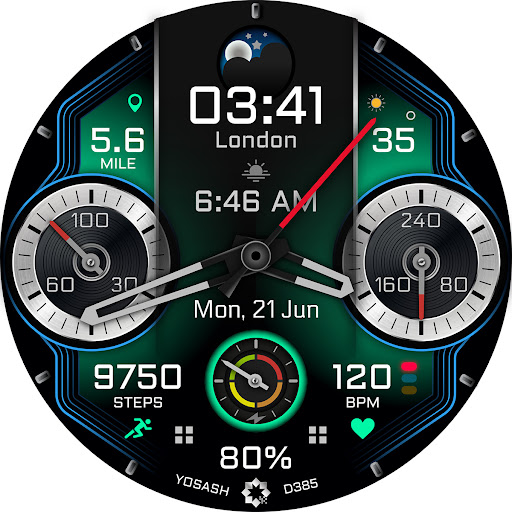


Customizable analog watch face for Wear OS with moon phases, shortcuts & colors
Customizable Analog Watch Face for Wear OS with Moon Phases, Complications & More Elevate your smartwatch experience with this fully customizable analog watch face for Wear OS. Featuring 3 custom complications, 2 custom shortcuts, and extensive color personalization options, this watch face allows you to tailor your device to suit your style and needs. Key Features: - Analog Style Watch Face with modern and elegant design for a trending look. - 3 Customizable Complications: Easily display vital information like steps, heart rate, battery status, and more. - 2 Custom Shortcuts: Access your favorite apps or features with a tap. - 10 Color Customization Options: Customize the background, sub-dials, and hands to match your personal style. - Moon Phases: Track the lunar cycle with a dedicated moon phase complication. - Always-On Display (AOD): Beautiful and functional AOD mode with customizable colors for easy readability. - Full Date Display: View the day of the week and day of the month. - Fitness Tracking: Monitor your steps, heart rate, and more, all at a glance. Perfect for users looking for a feature-packed, stylish, and easy-to-read watch face with a high level of customization. Whether you're tracking your fitness, checking the moon phases, or simply looking for a watch face that matches your style, this Wear OS analog watch face has you covered. ------------------------------------------------------------------ Buy one get one free promotion Buy D385 watch face, leave a comment in the store, and send a screenshot including your preferred watch face from YOSASH collection to yosash.group@gmail.com ------------------------------------------------------------------ Installation instructions: 1. Make sure that your watch is connected to your mobile via Bluetooth 2. Install the watch face and make sure that you selected your watch from the arrow beside the price 3. You can install the watch face through your watch directly by opening the play store on the watch and search for the watch face and install it. Official Samsung Installation guide https://www.youtube.com/watch?v=vMM4Q2-rqoM If you need any assistance, please contact to yosash.group@gmail.com ------------------------------------------------------------------ Watch face customization: - Tap and hold on any place on the watch face - swiping till find customize - Choose which complication do you want to customize - Select from the menu the complication that you want to show like weather, barometer, .. ------------------------------------------------------------------ Supported devices: This watch face supports all Wear OS devices with API Level 30+ like Samsung Galaxy Watch 4, 5, 6, 7, Ultra, Pixel Watch etc. ------------------------------------------------------------------ keep in touch: Facebook: https://www.facebook.com/yosash.watch Instagram: https://www.instagram.com/yosash.watch/ Telegram: https://t.me/yosash_watch Website: https://yosash.watch/ Support: yosash.group@gmail.com
1 year on Google Play
This app isn't currently appearing in any tracked top charts.