
Analog Classic 1 Wear OS 4+
Updated Oct 27, 2024 · vVARY


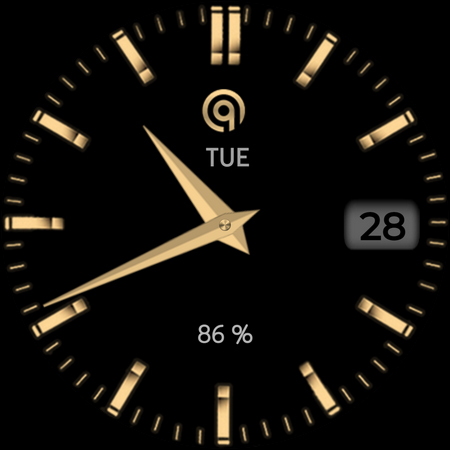


Analog Watchface for WEAR OS 4+ with multi colors and multi hand styles.
This is an Analog Classic watch face for WEAR OS and has following features:- ======================================================= NOTICE: READ THIS ALWAYS BEFORE AND AFTER DOWNLOADING OUR WATCH FACE TO AVOID ANY SITUATION YOU DON'T LIKE. ======================================================= This watch face for WEAR OS devices only has been made in Samsung Galaxy Watch face studio V 1.6.10 latest which is still evolving and has been tested on Samsung Watch 4 Classic , Samsung Watch 5 Pro, and Tic watch 5 Pro. It also supports other wear os 3+ devices. Some feature experience can be slightly different on other watches. a. Visit this link to official Install Guide written by Tony Morelan. (Sr. Developer, Evangelist)For Wear OS Watch faces powered by Samsung Watch face Studio. It is very detailed and precise with graphical and image illustrations on How to install the watch face bundle part to your connected wear os watch. Here is the link:- https://developer.samsung.com/sdp/blog/en-us/2022/11/15/install-watch-faces-for-galaxy-watch5-and-one-ui-watch-45 b.An effort also has been made to make a brief INSTALL GUIDE which is an image added with screen previews .It is the last image in previews of this watch face for newbie android Wear OS users or those who do not know how to install the watch face to your connected device. So it is requested to also make an effort and read it before posting cannot install statements This watch face for WEAR OS has following features:- 1. 7 x Background Styles for Main including default, the last one is pure black Amoled. 2. 5 x Hand Styles including default are available in customization menu. 3. Dim Modes are available for Main and AoD Display in customization menu. 4. Tap at OQ logo to open watch settings menu. 5. Tap at Date text to open watch calendar menu. 6. Tap at Day text below OQ Logo to open watch alarm menu. 7. Tap On BPM Text or Reading and it will start blinking and will stop blinking when the sensor completes reading and then the reading will be updated to fresh one.Please Note If for some reason the watch face misses required sensor permissions which you have to give when the watch face has been installed and launched 1st time . Go to settings > App >Permissions and give this watch face all sensor permissions. 8. 8 x Customizable Complications are available to user in the customization menu. 3 x complication visible and 5 x invisible complications shortcuts on Main Display for you to place shortcut of your favorite apps.
4 years on Google Play
This app isn't currently appearing in any tracked top charts.