
AWD Minimal Hybrid Watch face
Updated Aug 4, 2026 · vVARY


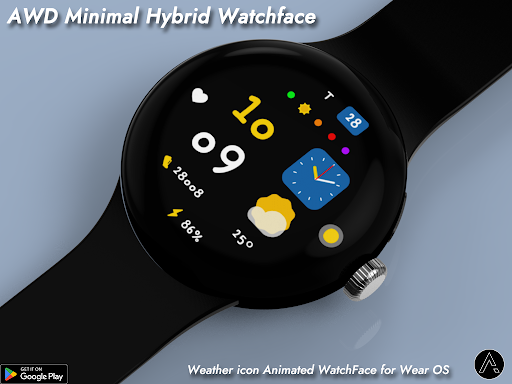


Cute handwritten digital time, sub-dial clock, dynamic themes, and live weather.
Clean, Modern, and Playful — AWD Minimal Hybrid Watchface Discover the perfect balance of minimal design and smart functionality! AWD Minimal Hybrid Watchface brings a unique handwritten digital clock paired with a sleek analog sub-dial, giving your smartwatch a stylish and practical aesthetic. [Key Features] Hybrid Dual Time Display: Features a charming handwritten digital clock alongside a classic sub-dial analog clock. Vibrant Theme Customization: Easily switch through multiple color themes for the main digital digits and sub-dial background. Dynamic Weather Illustrations: Real-time weather icons (sunny, cloudy, rain, snow, fog, thunderstorm) automatically adapt to current weather conditions. Comprehensive Health & Status Data: Real-time heart rate indicator & daily step counter. Live temperature display & battery percentage indicator. Date, day of the week, and UV status bar. Multi-language Support: Automatically syncs date and day display with your smartphone’s system language settings. Battery-Efficient AOD Mode: Clear Always-On Display mode designed for low battery usage. Upgrade your daily wrist style with AWD Minimal Hybrid Watchface! Features • Weather condition icon (Animated) • Hybrid Watch • Moonphase • UV Index & Risk Level Alerts • Real-time Step Counter • Battery % • Digital Time (12H/24H) & Full Date Customizing • 20 Color style change • 3 App shortcut • 1 Next event - Support wear OS - Square screen watch mode is not supported. ***Installation Guide*** The mobile app guides you through the watch face installation process. You can delete the mobile app once the watch face installation is complete. 1. Your watch and phone must be connected via Bluetooth. 2. Tap the "Install" button in the mobile guide app. 3. Follow the instructions to install the watch face. It will take only a few minutes. You can also search for and install watch faces directly from the Google app on your watch. You can also search for and install watch faces from a mobile web browser. Send feedback : aiwatchdesign@gmail.com
0 years on Google Play
This app isn't currently appearing in any tracked top charts.