
CELEST5585 Sport Watch
Updated Aug 5, 2026 · vVARY


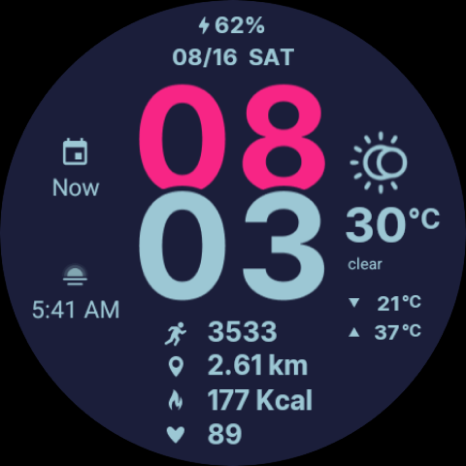


Bold digital Wear OS face with steps, calories, heart rate & weather stats
This bold and modern digital watch shows the time in a large, easy-to-read format, along with date, battery, weather, steps, heart rate, distance, and calories burned. Please note that distance and calories are only estimations, based on your step count. Designed to adapt to your preferences, this watch face automatically supports Celsius or Fahrenheit, kilometers or miles, and 12- or 24-hour time formats depending on your phone’s locale settings. You also get two customizable circular complications on the left side, giving you quick access to your favorite data such as calendar events, alarms, or app shortcuts. With 30 unique color variations, you can easily match your watch face to your style or mood. Whether you prefer a bright, energetic look or a sleek, minimal vibe, there’s a combination that fits every occasion. ⚡ KEY FEATURES · °C/°F, km/mi, 12/24 hour mode based on locale · 30 color variations · Battery-friendly AOD 📱 COMPATIBILITY ✅ Wear OS 5+ required (for weather functions) ✅ Works with Galaxy Watch, Pixel Watch, and all Wear OS 5+ devices 🔧 INSTALLATION HELP Having trouble? We've got you covered: - Use the dropdown menu next to "Install" on your phone to select your watch model or install directly from your watch's Play Store app - Updating weather data may take time after installation but switching to another watch face and switching back or restarting both the watch and phone usually helps - Check out our installation and troubleshooting guide: https://celest-watches.com/installation-troubleshooting/ - Contact us at info@celest-watches.com for quick support 🏪 DISCOVER MORE Browse our full collection of premium Wear OS watch faces: 🔗 https://celest-watches.com 💰 Exclusive discounts available 📞 SUPPORT & COMMUNITY 📧 Support: info@celest-watches.com 📱 Follow @celestwatches on Instagram or sign up to our newsletter!
1 year on Google Play
This app isn't currently appearing in any tracked top charts.