
CFS118 Digital
Updated Aug 24, 2026 · vVARY


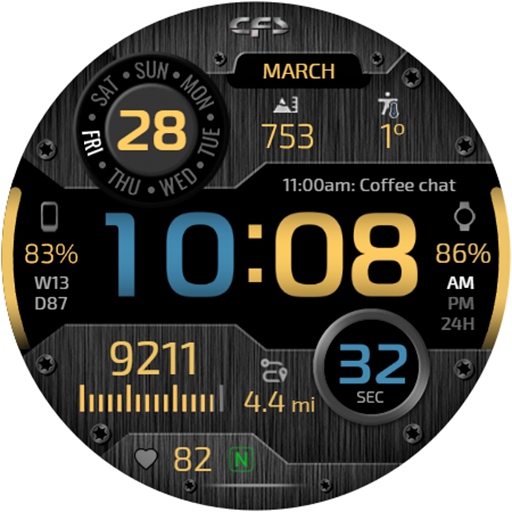


Digital Wear OS watch face with large time and weekdays in 10 languages.
A modern digital Wear OS watch face with large time display, weekdays in 10 languages, and useful everyday information. Watch face features: 🕒 Digital time in 12/24-hour format depending on phone settings 📅 Date 🌐 Weekdays in 10 languages* 👣 Steps 🔋 Watch battery level 📱 Phone battery level** 📍 Distance traveled in KM/MI*** ❤️ Heart rate 🎨 Multiple color schemes ⚙️ Complications and customizable shortcuts 🌙 Minimal and full AOD with 3 brightness levels 🌐 Weekday language: Select the required language in the watch face settings: English French Spanish Portuguese German Russian Indonesian Turkish Italian Korean 📱 Phone battery: To display the phone battery level, you need to install the free Phone Battery Complication app. 📍 Distance KM/MI: Select kilometers or miles in the watch face settings. The watch face uses an arithmetic formula to calculate the distance traveled: 1 km = 1312 steps 1 mile = 2100 steps The watch face is designed for users who want a clean digital interface with large time and clearly readable essential information: date, steps, distance traveled, heart rate, watch battery level, and phone battery level. Choose your preferred color scheme and customize shortcuts and complications to suit your daily needs. The watch face also supports weekday display in 10 languages. ℹ️ Availability of some features, complications, weather data, and other displayed information may depend on the watch and phone model, installed apps, permissions, and system settings. ⚙️ The Galaxy Wearable app may not always correctly support customization of complex watch faces. In this case, we recommend customizing the watch face directly on the watch. To open the watch face settings, touch and hold the watch screen. ⚠️ We can guarantee correct operation of touch zones only on Samsung watches. Their behavior may differ on watches from other manufacturers. 📧 If you experience any difficulties using the watch face, please contact us. We will do our best to help: seslihediyye@gmail.com 🌐 Installation instructions, customization tips, and additional information: https://cfswatchfaces.com ✈️ TELEGRAM: https://t.me/CFS_WatchFaces Thank you for choosing our watch faces!
1 year on Google Play
This app isn't currently appearing in any tracked top charts.