
Eclipse: Digital Watch Face
Updated Oct 16, 2025 · v1.0.0
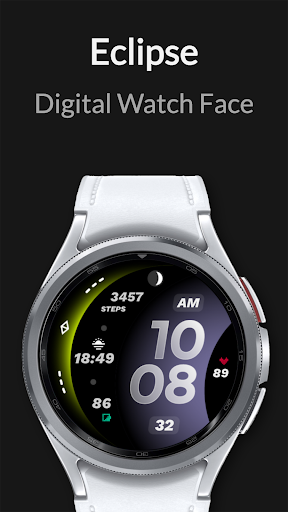


Futuristic digital watch face with color themes and smart customization.
Eclipse – Digital Watch Face for Wear OS by Active Design Experience the perfect fusion of futuristic style and everyday functionality with Eclipse. Its bold curved layout and glowing gradient accents create a striking visual experience while keeping essential information clear and accessible throughout your day. KEY FEATURES • Unique curved digital design with a futuristic, space-inspired look • Glowing gradient accents optimized for AMOLED displays • Clean, modern interface built for fast readability • Optimized for Galaxy Watch, Pixel Watch, and all Wear OS devices • Steps counter* • Heart rate monitoring* • Battery indicator • Date with AM/PM and seconds display • Automatic 12h / 24h time format • Multiple gradient color combinations • 2x custom app shortcuts for fast access • 1x custom complication for personalized data • Battery-optimized Always-On Display (AOD) mode • Clear, simplified AOD layout for easy viewing • Lightweight, smooth, and battery-efficient performance • Ideal for users who enjoy futuristic, glowing, and minimalist watch faces HOW TO USE 1. Install Eclipse from Google Play. 2. Ensure your smartwatch is running Wear OS 5 or later. 3. Touch and hold your current watch face, then scroll and select Eclipse by Active Design. NOTE • Health data (steps, heart rate, etc.) is provided by your watch sensors and system services.* • Grant all required permissions for full functionality. ABOUT ACTIVE DESIGN Active Design creates premium digital, analog, and hybrid watch faces with a focus on clarity, customization, and modern aesthetics. Discover more by searching "Active Design Watch Face" on Google Play. Activate Eclipse today and bring a futuristic glow to your wrist.
0 years on Google Play
This app isn't currently appearing in any tracked top charts.