![[KNA017] RETRO](https://play-lh.googleusercontent.com/AUJIFbzYiyXA1uNIbU_8V6uNJMM3ZRf0XV2EOMSXaMuPM9vctGQn6cSvzr4rSB5Hg5wGkHYMRB-wy75EpvQW7A)
[KNA017] RETRO
Updated Feb 14, 2026 · vVARY




Art of Combination Wear OS Watch faces
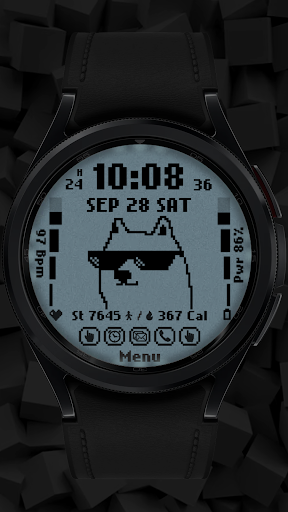
Wear OS Watch Face With Customizable Complications WATCH FACE INSTALLATION NOTES: (Please update your android to lastest version) How to install Watch Face To Wear OS Watch follow the link below: https://www.youtube.com/watch?v=AhS7D7YA0ps If Watch face not install in your Watch Please try ths method install Watch face via Wear OS Watch (If you cannot install via your smartphone) https://drive.google.com/file/d/1Ks0k68vwTua4eLPvMryORga0ZwViglWk/view?usp=drivesdk Check your watch's compatibility with WEAR OS before proceeding with the installation. (Note: Galaxy Watch 3 and Galaxy Active are not WEAR OS devices.) ✅ Compatible devices include API level 30+ Google Pixel, Galaxy Watch 4, 5, 6, and other Wear OS models. 🚨 Watch faces don't automatically apply on your watch screen after the installation. That's why you MUST set it on your watch's screen. Features: - Digital Styles (12/24 Hour Time format) - Date , Day of week , Month - 2 Customizable shortcut - 6 Colors 6 Styles - Steps Count , Heart Rate , Battery Level , Calories Calculate - Animation Retro stlye change by Time format (am-pm , 24h) Customization: 1. Touch and Hold Display 2. Tap on Customize Option Complications: You can customize with the any data you want. For example , you can select weather , world clock , sunset/sunrise , barometer etc. **Some features may not be available on some watches. For further support, please contact: sombatcsus@gmail.com Thank you for Your support.
1 year on Google Play
This app isn't currently appearing in any tracked top charts.