
S4U Ancient Gold Watch Face
Updated Oct 2, 2026 · vVARY

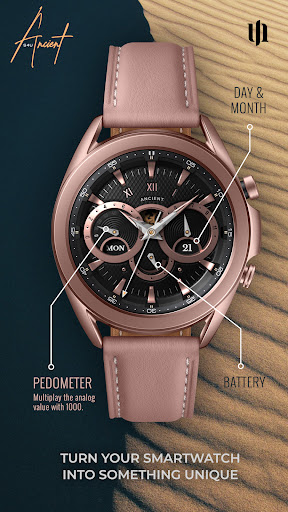


Ultra realistic high quality analog watch face for Wear OS.
**** ⚠️ IMPORTANT: Compatibility This is a Wear OS Watch Face app and supports only smartwatches running Wear OS 5 or higher (Wear OS API 34+). Compatible devices include: - Samsung Galaxy Watch 4, 5, 6, 7, 8 (incl. Ultra and Classic Versions) - Google Pixel Watch 1–4 - Other Wear OS 5+ smartwatches If you experience any issues with installation or downloading, even on a compatible smartwatch: 1. Open the companion app provided with your purchase. 2. Follow the steps in the Install/Issues section. Still need help? Feel free to email me at wear@s4u-watches.com for support. **** The “S4U Ancient” is a realistic classic analog watch face. Visual exclusivity is the main focus. The extraordinary 3D effect gives you the feeling of wearing a real watch. Take a look at the gallery to get a good impression. ✨ Key Features: - ultra realistic analog watch face - versatile color customization - 7 custom shortcuts to reach your favorite widget - have an always on display (AOD) *** 🕒 Data Displayed: Display in the right area: + Day of the month + month (analog) Display on the left: + Pedometer (each 10.000 steps the analog hand starts at 0) + Weekday Display at the bottom: + Battery Status 0-100 *** 🎨 CUSTOMIZATION OPTIONS 1. Press and hold the watch display. 2. Push the customize button. 3. Swipe left and right between the different customizable objects. 4. Swipe up or down to change the options of the objects. Additional functionality: + tap the battery hand to open the battery details **** 🌙 Always-On Display (AOD) The S4U Ancient watch face includes an Always-On Display feature for continuous timekeeping. Important Notes: - Using AOD will reduce battery life, depending on your smartwatch's settings. - Some smartwatches may automatically dim the AOD display based on ambient light conditions. *** ⚙️ SHORTCUTS Enhance your watch face with customizable app shortcuts: - App Shortcuts: Link to your favorite widgets for quick access. How to Set Up Shortcuts: 1. Press and hold the watch display. 2. Tap the customize button. 3. Swipe right to left until you reach the "complications" section. 4. Tap on any of the shortcuts to configure your preferred settings. **** 📬 Stay Connected If you enjoy this design, be sure to check out my other creations! I’m constantly working on new watch faces for Wear OS. Visit my website to explore more: 🌐 https://www.s4u-watches.com Feedback & Support I’d love to hear your thoughts! Whether it’s something you like, dislike, or a suggestion for future designs, your feedback helps me improve. 📧 For direct support, email me at: wear@s4u-watches.com 💬 Leave a review on the Play Store to share your experience! Follow Me on Social Media Stay up to date with my latest designs and updates: 📸 Instagram: https://www.instagram.com/matze_styles4you/ 👍 Facebook: https://www.facebook.com/styles4you ▶️ YouTube: https://www.youtube.com/c/styles4you-watches 🐦 X: https://x.com/MStyles4you
5 years on Google Play
This app isn't currently appearing in any tracked top charts.