
S4U Bastogne Field watch face
Updated Aug 27, 2026 · vVARY




Eye-catching analog field watch face with numerous customization options
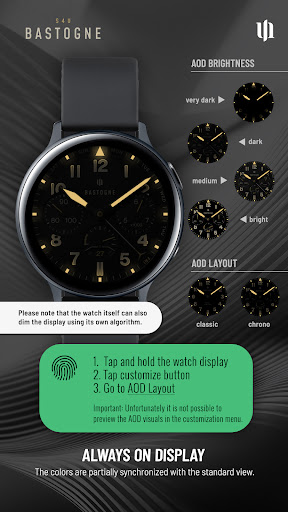
Discover the perfect blend of readability and functionality with this eye-catching analog field watch-style dial, offering a range of customizable options to suit your style. The watch face features 2 editable complications and 5 shortcuts. ━━━━━━━━━━━━━━━━━━ ⚠️ IMPORTANT: Compatibility & Installation This app is optimized for the new Watch Face Format regarding Wear OS 5 (API 34+). Compatible devices include: - Samsung Galaxy Watch 8, Ultra, 7, 6 , 5, 4 (Wear OS 5 update required) - Google Pixel Watch Series - Other Wear OS 5+ smartwatches (Note: Only devices running Wear OS 5 or higher are supported!) If you experience any issues with installation or downloading: 1. Ensure your watch is updated to the latest Wear OS version. 2. Open the companion app provided with your purchase. 3. Follow the steps in the Install/Issues section. Still need help? Email me at wear@s4u-watches.com. ━━━━━━━━━━━━━━━━━━ ✨ Key Features: - Realistic Design: Analog field watch face design. - Switch between classic and chronograph designs with a tap. - Color Customization: Personalize your watch with multiple dial color choices. - 2 Editable Values: Display user-defined data (e.g., weather, battery, heart rate). - 5 Shortcuts: Quickly access your favorite widgets/apps. - Always-On Display: Choose from 4 different brighness settings for optimal AOD functionality. ━━━━━━━━━━━━━━━━━━ 🎨 CUSTOMIZATION Personalize your S4U Bastogne in just a few steps: 1. Press and hold the center of the watch display. 2. Tap the customize button. 3. Swipe left or right to navigate through the customizable elements. 4. Swipe up or down to change colors or options for each item. Available Options: - Background Color: 10 - Background Stripe: off + 2 options - Weekend hand: off + 2 options - Background shadow: off, 5 options - AOD brightness: 4 (dark, low, mid, bright) - AOD Layout: 2 (classic, chronograph) Complications: - 2 Editable Complications - 5 App Shortcuts **** ━━━━━━━━━━━━━━━━━━ 🌙 Always-On Display (AOD) The watch face features an Always-On Display for continuous timekeeping. Colors automatically adapt to your chosen design with a pure black background. 4 AOD Brightness options: - dark, low, mid, bright 4 AOD Layout options: - classic, chronograph Note: - Using AOD will reduce battery life, depending on your smartwatch's settings. - Some smartwatches may automatically dim the AOD display based on ambient light conditions. - The AOD background uses a deep black background to keep the On Pixel Ratio (OPR) as low as possible. ━━━━━━━━━━━━━━━━━━ ⚙️ SHORTCUTS & COMPLICATIONS - App Shortcuts: Link to your favorite apps for quick access. - Editable Complications/Values: Display exactly the data you need. How to Set Up: 1. Press and hold the watch display. 2. Tap the customize button. 3. Swipe right to left until you reach the "complications" section. 4. Tap on any of the 5 editable shortcuts or 2 editable complications to configure your preferred settings. With these options, you can tailor your watch face to perfectly suit your daily needs! ━━━━━━━━━━━━━━━━━━ 📬 Stay Connected Enjoying the design? Check out my other creations! I’m constantly crafting new watch faces for Wear OS. 🌐 https://www.s4u-watches.com Feedback & Support I’d love to hear your thoughts! Suggestions and feedback help me improve. 📧 Email: wear@s4u-watches.com 💬 Please leave a review on the Play Store! Follow Me 📸 Instagram: https://www.instagram.com/matze_styles4you/ 👍 Facebook: https://www.facebook.com/styles4you ▶️ YouTube: https://www.youtube.com/c/styles4you-watches 🐦 X: https://x.com/MStyles4you
0 years on Google Play
This app isn't currently appearing in any tracked top charts.