
SD155
Updated Aug 11, 2026 · v1.0.0


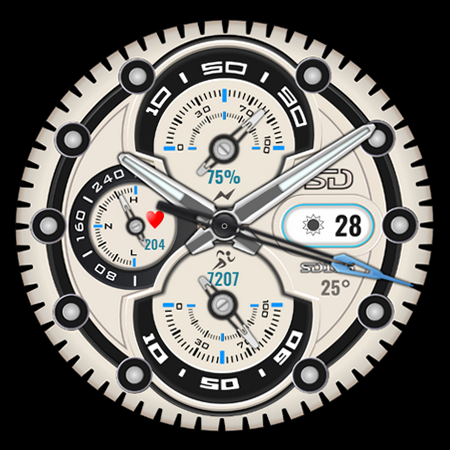


Chrono Watch
The sporty, multifunctional analog chronograph-style dial tracks your heart rate, steps, and battery level, with two shortcuts to connect to your favorite apps. The dial also displays the date, weather forecast, and outside temperature, and offers custom wallpapers and other small customization options. INSTALLATION NOTES: See this link for the installation and troubleshooting guide: https://speedydesign.it/installazione This dial is compatible with all Wear OS devices. Description: • Analog time • Date • Battery level + percentage • Step count + level • Heart rate + level • Current weather + temperature • 2 shortcuts • Always-On Display (AOD) Customizable: x 09 Background style x 09 Brand colors x 04 Second hand x 02 Hand colors x 09 Text and icon colors Customizing the watch face: 1 - Touch and hold the display 2 - Tap the Customize option Watch face complications: You can customize the watch face with any data you want. For example, you can select weather, heart rate, barometer, etc. Heart rate notes: The watch face does not automatically measure your heart rate and does not automatically display it upon setup. To view current heart rate data on the watch face, you must take a manual measurement. To do so, tap the heart rate display area. Wait a few seconds. The watch face will take a measurement and display the current result. Make sure you enabled the use of sensors when installing the watch face; if not, replace it with another watch face and then return to this one to enable the sensors. After the first manual measurement, the watch face can automatically measure your heart rate every 10 minutes. You will still be able to take a manual measurement. (Some features may not be available on some watches.) STAY UPDATED: newsletter@speedydesign.it SPEEDYDESIGN: https://www.speedydesign.it FACEBOOK: https://www.facebook.com/Speedy-Design-117708058358665 INSTAGRAM: https://www.instagram.com/speedydesignita/ Thank you!
0 years on Google Play
This app isn't currently appearing in any tracked top charts.