
VF Weather Hybrid Watch Face
Updated Jul 27, 2026 · vVARY


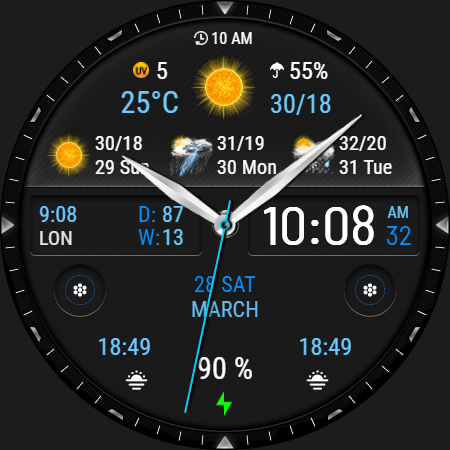


Weather & activity hybrid watch face for Wear OS with rich customization.
VF Weather Hybrid Watch Face — Stay Active in Any Weather Modern weather and activity hybrid watch face for Wear OS that combines dynamic weather forecasts, activity tracking and elegant customization. ⚠ Requires Wear OS API 34+ (Wear OS 5) Compatible with Galaxy Watch 6, Galaxy Watch 7/8, Galaxy Watch Ultra, Pixel Watch, TicWatch Pro and other Wear OS 5+ devices. Designed for users who want clear information, beautiful design and powerful personalization directly on their smartwatch. 🔹 Features Essential Information ✅ Time, date, battery level ✅ Smart battery color indicator — changes color based on the current charge level ✅ Option to switch between analog hands and digital time display ✅ Option to hide the leading zero in 12-hour time format ✅ Week number (W) and day of the year (D) ✅ Moon phase (when analog hands are disabled) Weather ✅ Current temperature and conditions ✅ UV index and precipitation probability ✅ Clear day and night weather icons ✅ Automatic switching between hourly and daily weather forecast Activity Tracking ✅ Steps, distance (KM/MI), heart rate ✅ Step icon changes color depending on activity level (low / medium / high) ✅ Heart rate icon changes color according to heart rate zone (low / normal / high) 🎨 Personalization & Style Customize the watch face to match your style. • 22 color themes • 7 background styles • 8 analog hand styles with the option to disable analog hands in the watch face settings • 6 Always-On Display (AOD) styles Additional customization options: • 3 customizable complications • 3 customizable app shortcuts • 1 hidden shortcut — tap the seconds area Hidden shortcuts: • Alarm — tap the hour or minute numbers • Calendar — tap the date 🔄 Weather or Activity — your choice Choose what the main information bar displays: weather forecast or activity data. Switch modes anytime directly in the watch face settings. 🚶♀ Distance (KM/MI) Distance is estimated based on your step count: • 1 km ≈ 1312 steps • 1 mile ≈ 2100 steps You can select KM or MI in the watch face settings. 🕒 Time format The watch face automatically follows your phone settings for 12-hour or 24-hour format. Leading zero in 12-hour format is enabled by default and can be turned off in the watch face settings. 🔹 Weather Weather Information Temperature units (°C / °F) follow your device system settings automatically. Day names in the daily forecast are displayed in English. The weather shortcut on Galaxy Watch devices opens the Samsung Weather app. On other Wear OS watches (such as Google Pixel Watch), the weather forecast will still display normally on the watch face, although the shortcut may not open a weather application. Weather data is provided by the system weather service on Samsung watches. Weather setup To display weather information correctly, please ensure that: • Location permission is enabled for the watch face • The watch is connected to your phone • Your phone has an active internet connection • The watch is within Bluetooth range of the phone Weather data is provided by the Samsung Weather system service. ⚠ Compatibility This watch face requires Wear OS with API 34+ (Wear OS 5 or newer). 🚫 Not compatible with rectangular watches. 🙏 Thank you for choosing my watch face! ✉ Have questions? Contact me at veselka.face@gmail.com — I’ll be happy to help! ➡ Follow me for exclusive updates and new releases! • Facebook - https://www.facebook.com/veselka.watchface/ • Telegram - https://t.me/VeselkaFace • YouTube - https://www.youtube.com/@VeselkaFace
0 years on Google Play
This app isn't currently appearing in any tracked top charts.