
WiFi QR Code Generator
Updated Aug 2, 2026 · v1.0.0


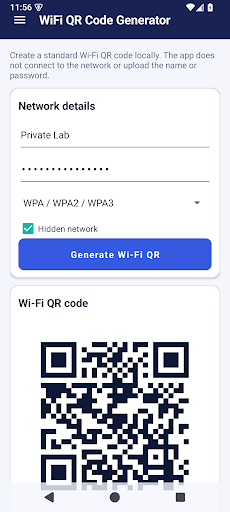

Create Wi-Fi QR codes locally, then save or share the PNG you choose.
Create a standard Wi-Fi QR code on your Android device, then save or share the PNG only when you choose. ENTER NETWORK DETAILS • Network name (SSID) • WPA/WPA2/WPA3, WEP, or open network • Password when the selected network type needs one • Optional hidden-network flag GENERATE LOCALLY The app builds the standard Wi-Fi QR payload and renders its bitmap on the device. It does not try to connect to the network, scan nearby networks, verify the password, or upload the name and password to the core service. SAVE OR SHARE Preview the generated code before doing anything with it. Save a PNG through Android’s system file picker or share the image through an app you select. The password text and generated bitmap remain in the current app session unless you explicitly choose Save or Share. PRIVACY-MINDED DESIGN The core generator does not need location, camera, microphone, broad storage access, an account, or cloud processing. The app includes advertising; advertising-related device identifiers are disclosed separately in Google Play Data safety. SHARE RESPONSIBLY Anyone who can scan a Wi-Fi QR code may be able to join that network. Confirm the network name and security type, and share the image only with people you trust. Delete exported copies when they are no longer needed. HONEST LIMITS Compatibility depends on the scanning device and its operating system. A generated code does not test network availability, internet access, router settings, password correctness, security strength, or authorization to share credentials. Use WiFi QR Code Generator for a home guest network, studio, office, classroom, or event when you want a clear local workflow and control over the exported image.
0 years on Google Play
This app isn't currently appearing in any tracked top charts.