
Phone Clone: Easy Share
Updated Aug 6, 2026 · v1.6


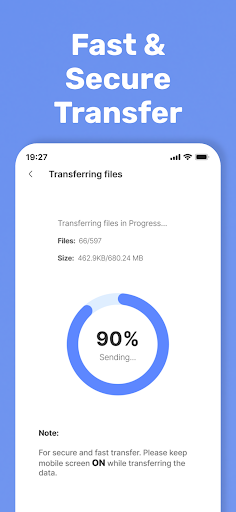


Copy my data, phone clone & fast file transfer. Quick share everything securely.
Switching to a new phone? Need to move your photos, videos, apps, and files fast? Smart Mobile Switch – Phone Clone & Easy Data Transfer App is the smoothest and safest way to transfer all your data between Android devices. Built for a clean, stable, and high-speed phone-to-phone experience, this all-in-one data transfer, phone clone, copy my data, and smart mobile switch tool ensures you never lose a single file during your device upgrade. Just connect, select, and transfer everything seamlessly. ⭐ Use It To ✔ Transfer data between smartphones ✔ Clone your phone instantly ✔ Send large files without cables ✔ Create secure local backups ✔ Share Anywhere through Mobile to PC ✔ Restore content to a new device ✔ Move phone storage with zero effort ✔ Perform full phone switch migration 🔥 Key Features for Fast & Safe Data Transfer 📱 Full Phone Clone Move your entire phone into a new device—apps, media, documents, contacts, files, and personal content included. Perfect for switching phones without losing anything important. ⚡ High-Speed Wi-Fi Transfer Transfer photos, videos, apps, and large files using Wi-Fi Direct or hotspot. It’s faster than Bluetooth, smoother than cables, and safer than cloud storage. 🔒 Private & Secure Your data never leaves your devices. No servers, no cloud uploads, no third-party access. All transfers use encrypted, direct, device-to-device connection. 📂 Transfer All File Types ● Photos & videos ● Music & audio files ● Apps & APKs ● Documents & PDFs ● Contacts This makes Smart Mobile Switch the best option for phone clone, content transfer, copy my data, and mobile file sharing. 🌐 Offline Data Transfer No internet required. Transfer and clone your phone anywhere—perfect for quick share, old-to-new phone migration, and secure offline transfers. 🔄 How It Works ● Install the app on both devices ● Connect using hotspot or the same Wi-Fi ● Select what you want to transfer ● Start the phone clone process ● Watch your data move instantly Simple steps. Clean design. Fast, reliable results. 🌍 Made for Every User Whether you're upgrading to a new phone, backing up your files, or sharing content with another Android device, the app makes the entire process effortless. Ideal for: ● Old to new phone transfer ● Phone upgrade migration ● Copy my data tasks ● Wireless file sharing ● Offline content transfer ● Personal, family, business use ⭐ Why Users Prefer Smart Mobile Switch ● Modern, simple, and intuitive interface ● High-speed Wi-Fi Direct for fast transfer ● Handles large files with ease ● No cables needed ● Secure offline phone-to-phone sharing ● Works on all Android devices 🎉 Start Your Phone Switch Today Transfer your photos, videos, apps, documents, and files in minutes. Smart Mobile Switch gives you the fastest, safest, and most reliable way to move your data securely and effortlessly. Upgrade your device with confidence— Download now and experience the smoothest phone-to-phone transfer solution.
0 years on Google Play
This app isn't currently appearing in any tracked top charts.