
핀플 - 근로자 남은연차확인 근태관리 출퇴근 연차관리
Updated Jun 11, 2026 · v1.5.18




Manage annual leave, 52-hour workweek, and attendance for salaried workers all in one place! Easily! Pinple replaces the work of a single HR manager.
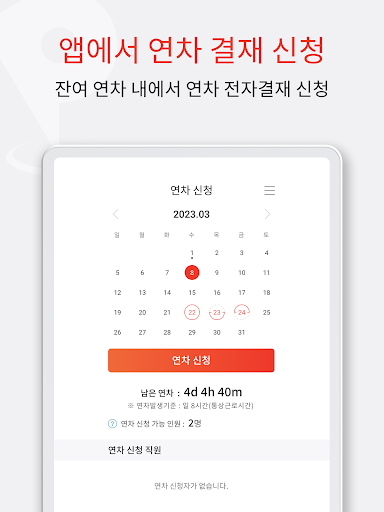
■ Worker Pinpl - Easy Smartphone HR Management Solve the hassle of complex clock-in/clock-out and annual leave requests with just the Pinpl Worker App. Pinpl is a non-face-to-face HR management SaaS designed in compliance with the Labor Standards Act and the Ministry of Labor's administrative standards. This app is exclusively for company employees. With just a smartphone, you can handle clock-in/clock-outs, automatic beacon-based clock-in, checking remaining annual leave days, electronic approval requests for vacations, business trips, and overtime, signing electronic employment contracts, and even requesting certificates of employment and career history—all in one go. If your company is currently using or comparing Shifty, Flex, JobCan, OfficeBalance, DaouOffice, ValueUp, or Shapple, be sure to experience Pinpl's simple usability and fast clock-in/clock-out features. ※ The Pinpl Worker App can be used after a company administrator first creates a workplace within the Pinpl Admin App. Sign up using the join code received from your company to be immediately integrated into your company's clock-in/clock-out and annual leave system. **Worker Pinpl** ◎ Convenient Clock-in/Clock-out 1. Clock in/out with a single touch at designated locations 2. Automatic notification sent to the manager simultaneously with clock-in/clock-out (no separate reporting required) 3. Clock-in/clock-out authentication is performed via the method designated by the company among Wi-Fi, GPS, and iBeacon 4. Supports automatic Beacon clock-in — Clock in automatically without opening the app when you enter the office beacon signal area (no more forgetting to clock in) 5. Easily authenticate remote work clock-in/clock-out via Wi-Fi/GPS 6. Check today's clock-in and clock-out times at a glance on the main screen 7. When the company working hours recording mode is applied, clock-in times before 9:00 are automatically converted to 9:00, and clock-out times after 18:00 are automatically converted to 18:00 (Note: iBeacon devices can only be used if purchased and installed separately by the company) ◎ Convenience of Applying for and Checking Annual Leave 1. Available annual leave is automatically calculated and displayed as long as your hire date is registered 2. View available, used, and remaining annual leave at a glance on the main screen Confirmation 3. Apply for annual leave, half-day leave, or quarter-half leave directly via electronic approval in the app. 4. Real-time push notifications for approval progress (Approved/Pending/Rejected). 5. Automatically deducted from annual leave upon approval, requiring no separate processing. 6. Notifications for unused annual leave starting 180 days before exhaustion — prevent leave from disappearing at the end of the year. 7. Late arrivals, early departures, and going out are automatically deducted from annual leave in accordance with company employment rules. ◎ Signing the Electronic Employment Contract via Smartphone 1. Sign immediately after verifying the employment contract on your smartphone, without a paper contract. 2. Use the form designated by the company, either the Pinple form or the Ministry of Employment and Labor standard employment contract form. 3. Sign after clearly confirming your contract conditions, such as monthly salary, annual salary, hourly wage, and whether you are a regular employee, contract employee, or hourly worker (part-timer). 4. The contract is automatically sent via email to both you and the company manager immediately after signing. 5. The Non-Disclosure Agreement (NDA) is completed and signed in the same manner at the time of hiring or resignation. 6. All documents are encrypted on the app and server. Retrievable anytime without worrying about loss ◎ Automatic 52-Hour Workweek Check 1. Your working hours are automatically calculated and can be checked on the main screen 2. Automatic notifications are sent to both the employee and the manager if working more than 45 hours per week (prevention of exceeding 52 hours) 3. Cumulative working hours can be checked on a weekly or monthly basis 4. Overtime and weekend work are accurately aggregated based on the time of electronic approval 5. Accurate working hours are automatically applied for workplaces selected to be recorded as company working hours ◎ Convenience of Mobile Electronic Approval 1. Apply for annual leave, business trips, overtime, and weekend work via electronic approval in the app 2. Automatic submission for approval following the approval line set by the company 3. For autonomous workplaces without a designated approval line, approval is processed immediately upon application 4. Real-time push notifications for approval progress (Pending, Rejected, Approved) 5. Approval details can be modified during the approval process 6. Immediate notifications when there are documents you need to approve — Approval possible from anywhere ◎ Check Our Company & Our Team Information 1. Our company's Check holidays (including substitute holidays and company anniversaries) in advance 2. Check your team's attendance status at a glance (displayed based on company settings) 3. Easy organization understanding with parent and subordinate team structures displayed exactly as they are 4. Directly submit requests for approval or inquiries to team managers ◎ Other convenient additional features 1. Instantly request certificates of employment and career history, automatically issued via email 2. Easy company joining via a join code (code can be changed for external exposure) 3. Automatic synchronization even if the clock-in/clock-out area changes 4. Even better features will continue to be added! ■ How to Join PinPl for Workplaces 1. Sign up and log in to PinPl 2. Enter the company joining code (Contact your company administrator) 3. Enter your hire date and personal information 4. Start clocking in and out using the method designated by the company (Wi-Fi, GPS, iBeacon) 5. Check your available annual leave on the main screen ■ Recommended for: · Office workers who sign a paper attendance sheet or report their arrival via messenger every day · Employees who find it cumbersome to request leave via KakaoTalk or email · Workers who frequently work from home or off-site and require proof of attendance · Employees at workplaces with 5 to 300 employees who are considering adopting attendance apps such as Shifty, Flex, JobCan, OfficeBalance, DaouOffice, ValueUp, or Shapple · Those who want to clearly verify contract terms using an electronic employment contract instead of a paper one ■ KakaoTalk Inquiry and Terms & Conditions · Developer: WooriYo Co., Ltd. · Service Name: PinPl (pinpl) · Website: https://www.pinpl.biz · Inquiry Hours: Weekdays 10:00–12:30, 13:30–19:00 · Terms of Service: https://www.pinpl.biz/00_pinpl_serviceprovision.jsp · Privacy Policy: https://www.pinpl.biz/00_pinpl_privacy_policy.jsp With the Pinpl Worker App, all administrative tasks for your work life—from commuting to annual leave, employment contracts, and certificates—can be handled with just a smartphone. Download it right now and join using your company's joining code.
4 years on Google Play
This app isn't currently appearing in any tracked top charts.