
Cyber Space Watch Face SGW7
Updated Jan 28, 2025 · vVARY


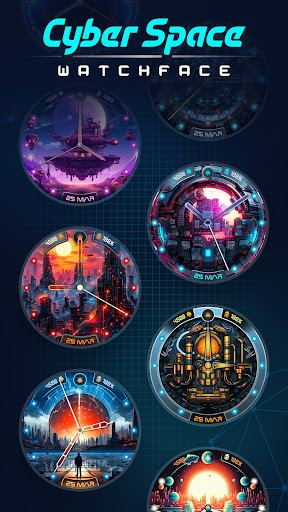


Discover the time in the futuristic analog theme watch face.
Cyber Space Watch Face SGW7 transforms your Wear OS watch into a sleek and high-tech marvel theme. It offers you cutting-edge futuristic analog designs of watch faces. It includes futuristic sci-fi inspired elements like neon-lit dials, planetary motifs, and futuristic layouts, this app brings the essence of tomorrow right to your wrist. Easily set analog watch faces and personalize your Wear OS screen with creative and eye-catching designs. Cyber Space Watch Face SGW7 is crafted with user-friendly features, offering a seamless experience to showcase your love for futuristic sci-fi style. Step into the future of timekeeping with this bold and visionary watchface app. Highlighted Features of Futuristic Cyperpunk Watchfaces App: • Cyber Themed Analog Dials • Attractive Color Options • Customizable Complications • Battery Indicator • AOD Support • Supports Wear OS 3, Wear OS 4, and Wear OS 5 devices. Supported Devices: Cyber Space Watch Face SGW7 app is compatible with Wear OS devices (API Level 30+) that support Google's Watch Face Format. - Galaxy Watch 7 - Galaxy Watch 7 Ultra - Pixel Watch 3 - Fossil Gen 6 Smartwatch - Fossil Gen 6 Wellness Edition - Mobvoi Ticwatch Series - Samsung Galaxy Watch 6 - Samsung Galaxy Watch 6 Classic - Samsung Galaxy Watch5 & Watch5 Pro - Samsung Galaxy Watch4 and Watch4 Classic and more. Complications: You can select and apply the following complications to your Wear OS smartwatch screen: - Date - Day of the week - Day and date - Next event - Time - Steps count - Sunrise and sunset - Watch battery - World clock Steps to Customize Watch Face & Set Complications: Step 1 -> Touch and hold the display. Step 2 -> Tap on the "Customize" option to personalize the watchface (dial, color, or complication). Step 3 -> In complication fields select the preferred data to view on the display. How to Download "Cyber Space Watch Face SGW7" on Wear OS watch: 1. Install via Companion App (Mobile App) • Open the companion app on your phone and tap "Install" on your watch. • If you don’t see a prompt on your watch, try toggling Bluetooth/Wi-Fi off and on again to resolve the issue. 2. Download From Wear OS Playstore • Open the Playstore in Wear OS smartwatch • In the search section, search for "Cyber Space Watch Face SGW7" and start download. How to Set "Cyber Space Watch Face SGW7" Watch Face: 1. Touch and hold the display. 2. Swipe left or right to select the watch face or tap "Add watchface" to select it from the Downloaded section. 3. Scroll and find "Cyber Space Watch Face SGW7" watchface and Tap on that watch face to apply it.
1 year on Google Play
This app isn't currently appearing in any tracked top charts.