
Glyph Icons and Widgets
Updated May 22, 2026 · v1.0.0


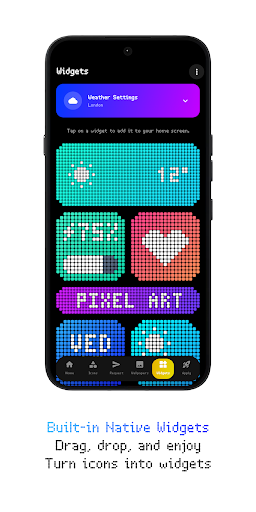
Craft a unique home screen with aesthetic pixel art widgets and bold icons
🔥 Glyph Icons and Widgets - Vibrant pixel art icons and perfectly grid-aligned widgets provide a striking, retro-aesthetic visual upgrade, seamlessly integrating with your dark mode interface. Upgrade your home screen with a meticulously crafted, perfectly symmetrical design. Whether you love retro pixel art or just want a clean, dark-mode optimized setup, Glyph provides over 6300 custom icons and completely native widgets to make your device stand out. Best of all? All of our widgets are 100% native: Absolutely no third-party apps required! ⭐ FEATURES: • 6300+ High-Quality Icons: A massive library of meticulously crafted pixel art icons. • All-New Dashboard: A fresh, modern, fully redesigned UI for the smoothest experience. • 10 Custom-Built Native Widgets: KWGT is NO longer required! They work completely standalone. • Brand New Widgets: Keep track of your day with beautiful Weather, Clock, Calendar, Battery, Marquee, and Music widgets. • Icon Widgets: Add standalone, perfectly aligned app icons directly to your home screen. • Live Wallpapers: Exclusive new animated live wallpapers to bring your screen to life. • Cloud Wallpapers & Effects: High-quality, cloud-based wallpapers with stunning effects, perfectly tailored for dark setups. • Premium Icon Requests: Want your missing icons themed instantly? Use our Premium Request tool for a 100% guarantee! • Free Icon Request Tool: Easily request missing icons. • Regular Updates: Constant improvements, new icons, and fresh widgets. 🛠️ How to use this Icon pack? • Install a supported Launcher • Open Glyph Icons and Widgets, go to the Apply section, and Select Launcher to apply. If your launcher is not in the list, make sure you apply it from your launcher settings. ✅ SUPPORTED LAUNCHERS: • Nothing Launcher • Nova Launcher • Lawnchair Launcher • Niagara Launcher • Smart Launcher 6 • Octopi Launcher • Microsoft Launcher • Shade Launcher • Lean Launcher • Hyperion Launcher • Posidon Launcher • Action Launcher • Stario Launcher and more. ⚠️ DISCLAIMER: • A supported launcher is required to use this icon pack! • For unsupported launchers, use the in-app Icon Widgets feature. • In Stock One UI Launcher, use Theme Park. • All 10 widgets are completely native! They work standalone and DO NOT require KWGT or any other third-party applications to function. • There is a TUTORIALS section inside the app which answers a lot of questions you may have. Please read it before emailing your question. 📫 CONTACT ME: X: https://twitter.com/narikdesign Telegram: https://t.me/narikdesign Instagram: https://www.instagram.com/narikdesign
0 years on Google Play
This app isn't currently appearing in any tracked top charts.