
Wifi Analyzer Pro
Updated Apr 16, 2026 · v9.07




Ad-free WiFi analyzer: scan networks, test speed, optimize channels & fix WiFi.
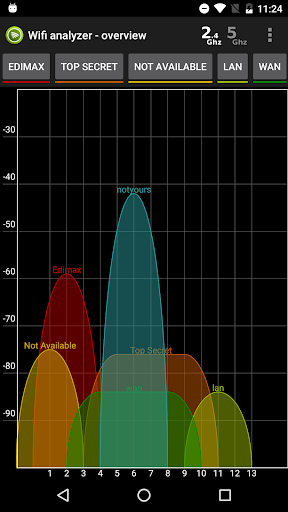
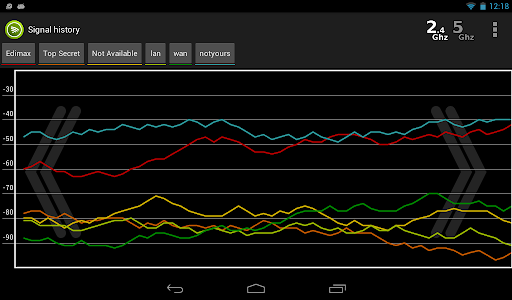
Ad-free version. Is your WiFi slow, unstable, or dropping out? Wifi Analyzer helps you find out why - and fix it. See every WiFi network around you, find the right channel for your router, test your internet and local network speed, and diagnose problems with professional network tools. Whether you're setting up a new router, optimizing coverage in your home, or troubleshooting at work, this app has you covered. Trusted by over 1 million users worldwide. WiFi Signal Overview View all nearby WiFi networks on an interactive real-time signal graph. See signal strength, channel overlap, and interference at a glance. Switch between 2.4 GHz, 5 GHz, and 6 GHz views. Tap any network for full details including encryption, channel width, WiFi standard, and router manufacturer. Channel Recommendation Not sure which channel to use? The wifi analyzer recommends the optimal channel by scanning all detected networks, calculating interference scores, and showing you exactly which channel will give optimal performance - for both new and existing access points. Speed Testing Internet Speed Test - measure your ping, download speed, and upload speed against worldwide servers. Results appear in real time with a clean 3-column display. WiFi Speed Test - measure the actual throughput between your phone and your router over your local network. Great for checking if your WiFi link is the bottleneck. WiFi Heat Map Upload your floor plan, walk around, and tap to measure. The app builds a color-coded signal map showing exactly where your coverage is strong, weak, or dead. Essential for placing routers, extenders, or access points. Network Tools Eight professional diagnostic tools built right in: Ping - latency measurement with jitter and packet loss analysis Traceroute - hop-by-hop path visualization to any destination DNS Lookup - full record query (A, AAAA, MX, NS, TXT) with SPF, DKIM, DMARC mail security audit and rating Port Scanner - scan port ranges, identify open services, security warnings Whois - domain registration, registrar, expiry, nameservers LAN Scanner - discover all devices on your network with MAC address and vendor identification SSL Certificate - full certificate chain inspection, TLS version, cipher analysis, security grade A+ to F Network Info - complete overview of your connection: IPs, gateway, DNS, DHCP, WiFi standard, public IP Signal History Track signal strength changes over time. Move around and watch the graph update live. Useful for finding the ideal placement for your router or workstation. WiFi List Sortable, filterable list of all detected networks. Sort by signal quality, name, or interference. Filter by channel - tap a channel on the overview graph to instantly see only networks on that channel. Privacy Location permission is required by Android for WiFi scanning - the app does not store or transmit your location. Wifi Analyzer combines wifi analysis, speed testing, and network diagnostics in one app. Download now and take control of your WiFi. Key features at a glance: ✓ Real-time signal graph (2.4 / 5 / 6 GHz) ✓ Channel recommendation engine ✓ Internet speed test and WiFi LAN speed test ✓ WiFi heat map with floor plan ✓ 8 network diagnostic tools ✓ DNS mail security audit ✓ SSL/TLS certificate grading ✓ LAN device discovery with vendor lookup ✓ Signal history ✓ Dark theme
10 years on Google Play
This app isn't currently appearing in any tracked top charts.