
RaiPlay Sound: radio e podcast
RAI Radiotelevisione Italiana S.p.A.
Updated Jul 28, 2026 · vVARY




All the radio, the author podcasts and the immense library of Rai audiobooks
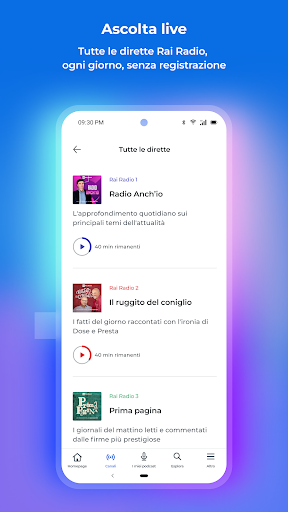
RaiPlay Sound is the free platform where you can listen, via live streaming and on-demand, to all Rai Radio live broadcasts and programs, hundreds of audiobooks read by top performers, unreleased podcasts, audio-described films and TV series, audio documentaries, and much more. You can access the RaiPlay Sound app with or without registration. Registration is free. If you access without registering, you can listen to live broadcasts from all Rai Radio channels, all national and regional news programs, audio clips, and bonus content from podcasts of your choice. By registering, you can also listen on-demand to full episodes of radio and TV programs, original podcasts, audiobooks, playlists, and audio descriptions of films and TV series. You can also enable notifications for your favorite content and download titles to the app to listen to offline. If this is your first time accessing a Rai multimedia platform, you can register your Rai account from the RaiPlay Sound app. If you already have a Rai account that you use to access RaiPlay, you can also use it to access RaiPlay Sound. To listen to live radio broadcasts, simply open the app and choose your preferred radio channel from the "Listen Live" section at the top of the homepage or in the "Channels" section of the app. In addition to tuning in to the live broadcast, you can view the programs for the day and the following week and, if you're registered, re-listen to episodes from previous days. You can also access the complete list of podcasts associated with each channel. From the live radio player, you can listen to a program that has already started and return to the live broadcast; you can switch to "car mode," change the channel you're listening to, view upcoming programs, share the live broadcast, access information and podcasts for the program currently airing, and set a sleep timer. If the program offers this service, you can also contact the editorial staff using your device. If you're registered, you can add the program you're listening to to your favorites. From the "Explore" section, you can search for content by title and keywords and discover the selection of podcasts available on demand and organized by genre. From the on-demand player, you can also share the content you're listening to, set a sleep timer, skip to the next or previous episode, and view information about the audio currently playing. By registering, in addition to having access to the entire catalog, you can also access the "My Podcasts" area and customize your listening experience: you can add podcasts to your favorites (Followed) and, for each podcast you follow, activate notifications to be notified when new episodes of that podcast are released; download the titles you're interested in to the app for offline listening (Download); create personal playlists (Add to playlist) and track a specific point in an audio file to find it again later (Add bookmark). In the "My Podcasts" section, you can find and manage your most recent listening sessions to resume where you left off, the podcasts you follow, the bookmarks and playlists you've created, your in-app downloads, and use the Alarm Clock feature. From the "More" section, you can create and manage your Rai account and notifications, access FAQs and the help center, and choose whether to enable streaming and downloading content when your device is connected to Wi-Fi. CONTACTS rai.it/centroassistenza supporto@rai.it www.raiplaysound.it Privacy policy: https://www.rai.it/privacy In accordance with Law No. 4 of January 9, 2004, we have published the accessibility statement for the RaiPlay Sound app at the following webpage: https://www.rai.it/corporate/disclaimer/dichiarazione-di-accessibilita
13 years on Google Play
This app isn't currently appearing in any tracked top charts.