
Pic Reminder – Visual Cues
Updated Aug 17, 2026 · v1.0.0

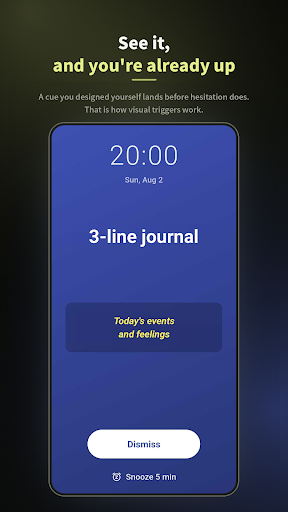


Design your own visual cue. Behavioural science that turns later into now.
■ Swiped past that reminder again? An ordinary reminder is one small line in your notification shade. Pic Reminder shows up at the time you set, full screen, in the design you made yourself. It brings the visual cue from behavioural science into the notification itself. ■ Main features FULL-SCREEN ALERTS Your reminder fills the whole screen at the time you set, using exact alarms that keep working in battery-saver mode. DESIGN EDITOR Customise the background colour, text colour, font size, bold/italic and layout. Drag the text wherever you want it. The preview you edit and the alert you actually get are rendered exactly the same way. BACKGROUND IMAGE Use a photo from your phone as the alert background. ALARM MUSIC Set your own audio file as the alarm sound. It loops while the full-screen alert is showing and stops when you dismiss or snooze it. REPEAT Daily / weekdays / weekly / your own choice of days. Once one fires, the next is rescheduled automatically. SNOOZE Five more minutes, from the notification action or from the full-screen alert. MULTILINGUAL English, Japanese, Spanish and Simplified Chinese. Follows your device language automatically. ■ Great for - Reminders you tend to miss, or keep putting off - Habits you want to keep up: journalling, studying - Everyday chores you forget: watering plants, taking out the bins - Wanting to act the moment the notification arrives - Wanting a reminder built on behavioural science ■ About permissions To appear full screen on top of your lock screen, the app needs notification, exact alarm, full-screen intent and overlay permissions. A guide walks you through each one on first launch. Privacy policy: https://doc-hosting.flycricket.io/picreminder-pp/9e965aec-4e6b-46e7-b7a8-825d87c63c12/privacy
0 years on Google Play
This app isn't currently appearing in any tracked top charts.