
血圧手帳 - 毎日の血圧管理に
Updated Aug 15, 2026 · v2.15




You can easily and conveniently record and manage your daily blood pressure.
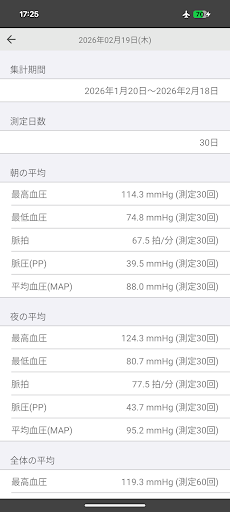
This app is designed for easily recording and managing your daily blood pressure. Recorded values are displayed on a single page in both graph and list format. Using the app is very simple. Just press the input button and enter your systolic blood pressure, diastolic blood pressure, and pulse rate. The graph line can be switched with a single touch between morning only, evening only, or both morning and evening. Graphs and lists are displayed continuously across months, rather than monthly. Main Features • Input available twice a day (morning and evening) • Memo input available • List can be exported as a PDF • Statistical data for a specified period can be viewed (default is the past 30 days) • Pulse pressure (PP) and mean arterial pressure (MAP) are displayed In the list and PDF export, high blood pressure (systolic blood pressure of 135 or higher, or diastolic blood pressure of 85 or higher) is displayed in red. To delete entered data, long-press the data on the list. * Pulse pressure - A reading of 60 or higher is a cause for concern; it indicates a tendency towards arteriosclerosis in the larger blood vessels closer to the heart. (Normal range: 40-60) * Mean blood pressure - A reading of 90 or higher is a cause for concern; it indicates a tendency towards arteriosclerosis in the smaller blood vessels further from the heart. (Normal range: less than 90) Regarding printing on Android 17 Using the "default print service" on Android 17 may block printing depending on the printer. Please try installing the print service provided by the printer manufacturer (Canon Print Service for Canon printers). * How to set up the print service Open the Settings app, go to Connection Settings → Advanced Connection Settings → Print, turn OFF the default print service, turn ON the installed print service, and restart the Blood Pressure Log app to print. To send a PDF to your computer via email, press the print button on the PDF creation screen, and select "Save as PDF" in the output destination selection at the top of the screen. Then save it to your Downloads folder. Next, in the Downloads or Files app, select the blood_pressure.pdf file in the Downloads folder and send the file. This app is free, so if you're concerned about your blood pressure, please feel free to try it out.
4 years on Google Play
This app isn't currently appearing in any tracked top charts.