
Document Pro
Updated Mar 18, 2026 · v11.6.8




JPG to PDF, QR Scanner And Genrator,Image/PDF size reducer & Pixel Resizer
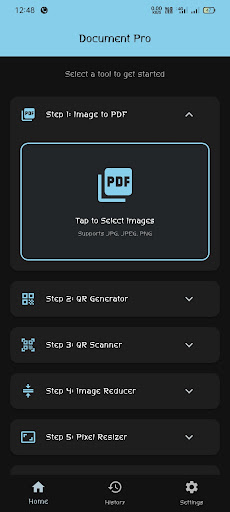
Document Pro: The Ultimate Document & Utility Powerhouse Tired of downloading five different apps for simple daily tasks? Meet Document Pro, a high-performance, lightweight utility application designed for speed, privacy, and efficiency. Built with a strict "No-Backend" philosophy, your data stays entirely on your device, ensuring maximum security and lightning-fast processing at up to 120 FPS. We have combined essential digital tools into a single, sleek interface using native Material Design. Whether you need to convert an image to a PDF for an assignment or compress a heavy document for a portal upload, Document Pro handles it all with super-smooth animations. 🚀 Key Features (6 Powerful Steps): 1. Fast JPG to PDF Converter Instant Conversion: Select your photos (JPG, PNG) and instantly convert them into a high-quality PDF document. Perfect for Students & Pros: Ideal for submitting assignments, sharing notes, or compiling official documents. 2. Pro QR Generator Create high-quality custom QR codes for text, URLs, or contact info in seconds. Share them instantly from the app. 3. Native QR Scanner A super-fast, built-in scanner to decode any QR code using your phone’s live camera. You can also pick and scan QR images directly from your gallery. 4. Advanced Image Reducer Shrink File Size: Reduce image file size (from MB to KB) seamlessly. Maintain Clarity: Perfect for strict government forms and official online portals where size limits apply. 5. Precision Pixel Resizer Custom Dimensions: Input accurate pixel width and height for professional-grade resizing. Total Control: Ensure your photos fit perfectly for any platform requirement. 6. Powerful PDF Reducer Compress Documents: Easily shrink the size of heavy PDF files. Quick Sharing: Make your PDFs lightweight enough to share via email or messaging apps without data limits holding you back. 💎 Premium User Experience: Fluid Performance: Optimized to support 60 FPS to 120 FPS, providing a "butter-smooth" feel on all modern Android devices. Native UI: Built with clean native icons and modern accents for a professional look. Adaptive Theme: Full support for system Dark Mode and Light Mode to reduce eye strain. Ultra-Lightweight: We’ve optimized our libraries to ensure the app runs flawlessly even on budget smartphones. Privacy First: No Login, No Authentication, and No Backend. Your files and data never leave your phone! 🛠️ How to use Document Pro: Home: Access all 6 core steps directly from the main dashboard. History: Track, edit, and manage your past conversions and scans with our timestamped History Screen. Settings: Toggle themes, clear history, or leave us a review to help us grow. Document Pro is built for users who value their time, privacy, and storage space. Download now and experience the smoothest utility app ever made! Keywords: JPG to PDF, PDF Compressor, QR Scanner, QR Generator, Image Compressor, Image Resizer, Fast PDF Maker, Offline Document Tool, Indian Utility App, Pixel Accurate Resizer.
0 years on Google Play
This app isn't currently appearing in any tracked top charts.