
WalkTracker: Hiking Trails GPS
Updated Aug 26, 2026 · vVARY




Track and/or follow hikes | No accounts: Works instantly | Offline maps
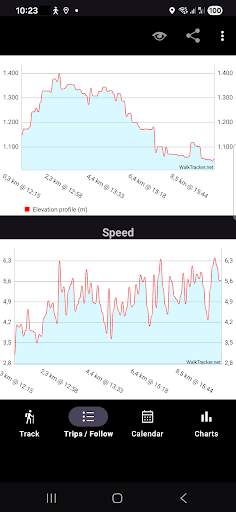
Go outdoors and discover beautiful nature around the planet by using this privacy first, fully offline, free, no-nonsense, easy-to-use: WalkTracker - which will turn your Android device instantly without creating an account, into a high quality GPS hike tracking device: a hike tracker. Start instantly! You can also import a pre recorded GPX track from any source/website to navigate you to explore new amazing hiking tracks. The adventure is out there! Experience this instantly by installing the app now! The application has been developed by, and specially designed and tuned for walkers/hikers. This means a low energy consumption so it can track for a long time/long distance. Prepare yourself at home by downloading the offline maps of the area you plan to visit (see Settings), so no expensive mobile operator costs when you are on route and no worries about places with poor signal. WalkTracker is for experienced and novice hikers for short or long distances. - Tracking / Recording hike WalkTracker will record your hiked route, calculate distance, speed and elevation gained. A smart algorithm will calculate for every completed track a 'difficulty indicator' (easy/moderate/heavy). You can share the GPS data with friends and/or your social network by pressing the share-button. Send an image of the track, elevation profile and/or GPX file to email, Facebook, Instagram, Signal, Telegram, WhatsApp, WalkTracker Wiki and/or any other compatible application. The WalkTracker Wiki is a website containing hiking trails, shared by the community of WalkTracker users. The app will submit every completed 5 km a notification i.e. to your connected smartwatch. Of course you can change from kilometers to miles or change this distance interval or switch it off. - Following / Navigating pre recorded GPX track Besides of recording your track as GPX, you can follow those tracks too. You will receive turn-by-turn navigation instructions at your Android device and/or at your connected watch. Besides of that you see a map with the route, your current location and a compass. To import a track, send a GPX file as attachment by email. Open the attachment or GPX file in the file explorer using 'WalkTracker'. In the latest version your smartwatch / Wear OS device is an extension for this (accompanying) app, kind of a remote control, which will not function standalone. You can start/stop tracking from your watch. While you are moving (needs location updates), you see the average speed, duration an distance of the track. Using the Following function, you will see a compass with direction information. It is important that your mobile device (phone) is receiving location updates. After an interval, to reduce battery consumption, you will see your progress on your watch. How to use your smartwatch (Wear OS) to control the accompanying mobile app? 1) Pair WearOS- and Android (mobile)- device 2) Install WalkTracker app both at your Mobile (Android) and Smartwatch (WearOS) 3) Start app at Mobile and give Location permission while using app 4) Start app at Smartwatch 5) Press 'arrow to the right'-button to start recording your hike 6) Start walking to see speed, distance and duration at your watch Need at least two location updates to see relevant data. To upload offline maps to the smartwatch, first download them to your mobile device (phone): Settings->Manage offline maps. After that, at your smartwatch go to the third screen (swipe) to sync maps and accept the requested permissions. At you mobile device you see a 'sync maps management view'. Press the upload button, to upload a map to your smartwatch. This is a long lasting action, so a foreground service will handle this. Please report any bugs before giving negative feedback so we can fix them as soon as possible (In Google Play - Developer - Send email). More information: http://blog.videgro.net/2014/08/walktracker/
12 years on Google Play
This app isn't currently appearing in any tracked top charts.