
Photo Exif Editor Pro - Metada
Updated Nov 5, 2025 · v2.5.0


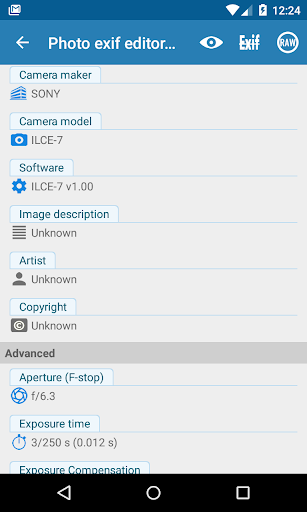


Photo Exif Editor allows to view, add and modify EXIF data of multiple photos
Photo Exif Editor allows you to view and modify the Exif data of your pictures. With the clear user interface, Photo Exif Editor is an easy to use tool that helps you to correct the missing information of your favorite photos. This is Pro version with: • No ad. • The ability to show the full raw data of the picture. NOTICE All the features of our app "EXIF Pro - ExifTool for Android" will be merged into this application soon. It will include the abilities to edit pictures (JPG, PNG, RAW...), audio, video, please be patient! Android 4.4 (Kitkat) does not allow non-system application to write file to the external sdcard. Please read more at: https://metactrl.com/docs/sdcard-on-kitkat/ To open Camera, long tap on the Gallery button What is the Exif data of picture? • It contains Camera settings, for example, static information such as the camera model and make, and information that varies with each image such as orientation (rotation), aperture, shutter speed, focal length, metering mode, and ISO speed information. • It also includes the GPS ( Global Positioning System) tag for holding location information where the photo was taken. What can Photo Exif Editor do? •Browse and view Exif information from Android Gallery or from Photo Exif Editor's integrated photo browser. •Add or correct the location where photo was taken using Google Maps. •Batch editing multiple photos. •Add, modify EXIF tags: - Camera model - Camera maker - Captured time - Orientation (rotation) - Aperture - Shutter speed - Focal length - ISO speed - White balance. - Much more another tags... If you're facing any problem, want new feature or have feedback to improve this application, don't hesitate to send it to us via the support email: support@xnano.net Permission explanation: - WiFi Permission: This application requires network connection to load the Map (Google Map). - Location permission: This is an optional permission to allow the Map to identify your current location. For example in the case of application Maps", there is a button on the map, when you taps on it, the map moves to your current location. On Android 6.0 and above, you can choose to deny this location permission.
10 years on Google Play
This app isn't currently appearing in any tracked top charts.