
Smart Calendar Pro
Updated Jul 24, 2026 · v4.0


Simple, powerful calendar app with multiple views, events & offline support
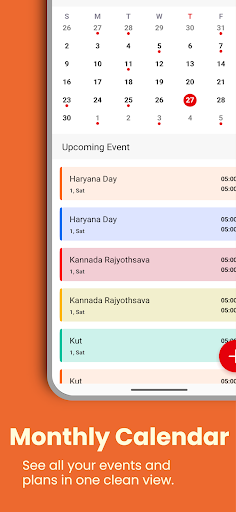
Stay organized with a powerful and simple 📅 Calendar App designed to make your daily planning fast and stress-free. This all-in-one event planner, schedule manager, and reminder app helps you track meetings, birthdays, deadlines and personal tasks with ease. 📅 Calendar Views View your schedule the way you prefer: 🗓️ Monthly Calendar for quick overview 📆 Weekly Planner for detailed planning 📅 Daily Schedule for today’s events 📍 Yearly Calendar for long-term planning 📋 Event List for upcoming activities 🔍 Month + Day View for balanced planning Switch between views instantly with a tap. ✏️ Event Creation and Management Plan and organize events without effort: 📝 Add titles, notes and locations ⏱️ Set time or mark all-day events 🔁 Create recurring events 👥 Add participants 🎨 Use event colors and categories ✏️ Edit, delete or reschedule anytime 🔎 Search events quickly Perfect for personal tasks, office meetings and class schedules. 🔔 Reminders and Notifications Never miss an important moment: ⏰ Up to three reminders per event 📅 Flexible reminder timing 🔄 Loop reminders 🎵 Custom alert tones 📳 Vibration support 😴 Snooze options 📲 System notification support 🎨 Personalization Customize your calendar experience: 🕒 12-hour or 24-hour format 📅 Start week on Sunday or Monday 🎯 Weekend highlighting 🔢 Week numbers 🔍 Adjustable font size 🧩 Grid line options 🌈 Custom event colors 🌙 Dim past events 📉 Control how far back past events appear Keep your data safe and updated: 📥 Import ICS files 📤 Export ICS backups 🔃 Pull-to-refresh sync 📂 Manage synced calendars 🚀 Auto-sync on boot 🏠 Home Screen Widgets Use your calendar without opening the app: 🗓️ Monthly widget 📋 Event list widget 📅 Today’s date widget Customize widget style and tap actions. ⭐ Extra Tools 🎉 Country-specific holidays 🎂 Birthday and anniversary tracking 🤝 Meeting scheduler 🌍 Time zone settings 🔒 Full offline mode (no internet needed) 🛡️ Privacy and Storage Your data stays safe: 📴 Fully offline support 🙅 No sign-in required 🔐 Full control of your information 🎯 Ideal For 🎓 Students planning study schedules 💼 Professionals managing meetings 👨👩👧 Families organizing routines 📵 Users who want an offline calendar 📚 Anyone looking for a clean, ad-free Google Calendar alternative 🌟 Highlights ✓ Clean, fast and easy to use ✓ Multiple calendar views ✓ Powerful event tools ✓ Reliable reminders ✓ Home screen widgets ✓ ICS import/export ✓ Full customization ✓ Works offline ✓ No subscriptions Take control of your time with a smart, feature-packed calendar that fits your daily life.
0 years on Google Play
This app isn't currently appearing in any tracked top charts.