
Nishkulanand Kavya
Shree Swaminarayan Mandir Bhuj
Updated Apr 11, 2026 · v1.0.16


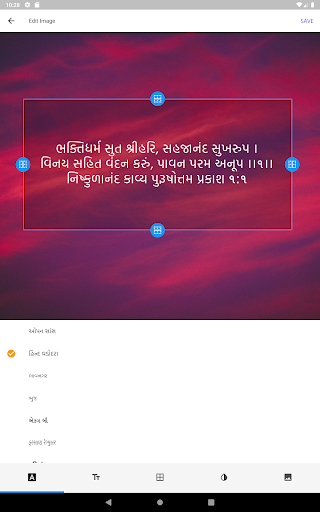


Nishkulanand Kavya written by Pu. Nishkulanand Swami
Read and study all granths from Nishkulanand Kavya, as written by Pu. Nishkulanand Swami. 1. Purushottam Prakash 2. Sneh Gita 3. Vachan Viddhi 4. Saar Siddhi 5. Bhaktinidhi 6. Haribalgita 7. Hruday Prakash 8. Dhirajakhyana 9. Hari Smruti 10. Chosath Padi 11. Manganjan 12. Gungrahaka 13. Shri Hari Vicharanam 14. Araji Vinay 15. Kalyana Nirnaya 16. Avatar Chintamani 17. Chin Chintamani 18. Pushpa Chintamani 19. Lagna Shakunavali 20. Vruttavivaha 21. Yamadanda 22. Shikshapatri Bhashya The Nishkulanand Kavya App contains easy-to-use features such as: Personal Account Register for an account using your email address or login using your existing Google or Facebook account for added functionality; notes, reading list, reading history and search history are automatically backed up. Seamless Switching Between Devices If you are logged into the app, your notes, reading list, reading history and search history all instantly synced to your other devices. Generate Quote Images Create unique and stunning images, with quotes directly from Nishkulanand Kavya. Great for sharing with friends. Auto Bookmark Access the last page that you visited from the home screen. Reading List Add to your reading list so that you never forget your "wish" list of ones to read as part of your study or research into a particular topic or concept. 3 Different "Languages" Gujarati, Gujarati Transliterated (Lipi/Latin), Gujarati Phonetic. Dark or Light Mode Read in the mode that best suits your eyes during the day or night. Adjustable Font Size Increase or decrease the font size to suit preference. Line Spacing Choose from 3 different line spacing options to suit your reading preference. Split Screen Mode Read the same page in 2 different languages. Great for those who are learning Gujarati or those who are having difficulty pronouncing difficult words. Share Share a link to the whole page or individual paragraphs with your friends. Notes Write personal notes about the whole page or individual paragraphs. Copy Copy paragraphs to easily paste text to apps that don't support sharing. Dictionary Clickable difficult words; overlay window displays simple definitions of regional, scriptural and philosophical words. Search Search for any word in any language to get results of where this word appears, clicking on the desired result takes you to reading mode.
8 years on Google Play
This app isn't currently appearing in any tracked top charts.