
Notification Blocker & Cleaner
Updated Dec 27, 2025 · v1.6


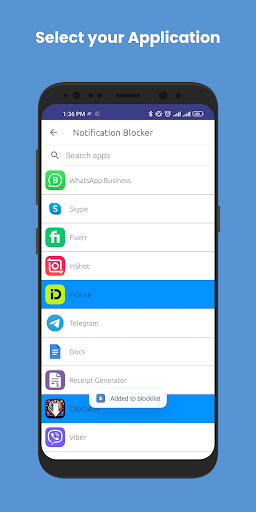


Block app notifications & alerts. Stay focused & distraction-free!
Block Notifications. Boost Focus. Take Control. Overwhelmed by constant popups and alerts? Notification Blocker is the easiest way to block unwanted notifications, hide persistent system messages, and clean up your notification bar — without root access. With 100,000+ downloads, we help you stay distraction-free, focused, and in control of your digital life. 🚀 Top Features 🛑 Smart Notification Blocker • Block notifications from any app • Hide annoying system alerts like “App running in background” or “Using battery” • Mute push notifications without uninstalling apps 📆 Scheduled Notification Blocking • Set quiet hours (work, sleep, meetings) • Auto-block alerts during custom time slots • Daily schedules with repeat options 🧹 Notification Cleaner & History • Keep your status bar clean and organized • View blocked notifications anytime within the app • Tap to open the app linked to the blocked notification 🔐 Privacy-Focused • One-tap lock screen feature for security • Works without root • No ads, no data collection – your privacy is our priority ⚙️ User-Friendly & Lightweight • Simple UI for all users • Works on most Android devices • Battery-friendly & fast performance 📤 Bonus Tools • Easy APK sharing with friends • Custom profiles for different blocking needs • Whitelist important apps or keywords 💡 Why Use Notification Blocker? Tired of WhatsApp, Facebook, Instagram, or system alerts disturbing you all day? Whether you're working, sleeping, gaming, or relaxing — Notification Blocker gives you complete control over your phone’s alerts. Block, manage, and clean notifications the smart way. 📲 How to Enable on Popular Devices: 🔹 HUAWEI: Settings → Advanced Settings → Battery Manager → Protected Apps → Enable Notification Blocker 🔹 XIAOMI: Settings → Permissions → Autostart → Enable Notification Blocker Battery → Battery Saver → Choose Apps → Select Notification Blocker → No restrictions ⚠️ Known Issues • Android 8 (Oreo): Heads-up notification blocking is limited due to system restrictions • Some devices may kill the app in background — whitelist it from battery optimization settings ✅ Take Back Control of Your Notifications Today! Download Notification Blocker now and enjoy a cleaner, quieter, and more focused digital experience.
6 years on Google Play
This app isn't currently appearing in any tracked top charts.