
Poste Business
Updated Jul 30, 2026 · v4.60.11




One App: MPOS and Code, Business Link Accounts, PP Business Debit Cards
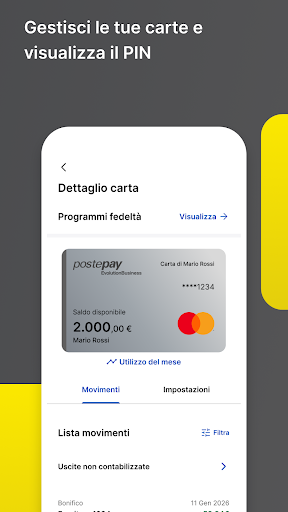
With the PosteBusiness App, you can manage your business: • your BancoPosta Business Link accounts • your Postepay Business debit cards • your Postepay Evolution Business prepaid cards • your SmartPOS, MPOS, and Postepay Code service receipts To find out which post offices you can apply for to open BancoPosta Business Link accounts and activate Postepay Business debit cards, visit www.poste.it in the Banking Transparency section. MANAGE YOUR BANCOPOSTA BUSINESS LINK ACCOUNTS • Access and manage all your BancoPosta Business Link accounts easily with a single app. And if you have multiple companies authorized to provide financial services, choose which one you want to operate with in the app. • Make payments on the go. You can complete and authorize your payments in the app, including those set up by your employees via online banking. • Use the calendar to remember the deadlines for your most important collections and payments. MANAGE YOUR POSTEPAY BUSINESS DEBIT CARDS • View transactions made with Postepay Business Debit Cards. • Manage and customize daily and monthly payment and withdrawal limits, enable cards for online purchases, even for specific spending categories, view your PIN, and much more. • You can also always view the amounts related to the ScontiPoste and Cashback Business loyalty programs. CASH WITH MPOS POSTEPAY MPOS Postepay is a service that allows you to accept payments with credit, debit, or prepaid cards on the go. To collect payments, pair your Mobile POS device with the PosteBusiness App on your smartphone/tablet (enabled with data connectivity in Wi-Fi or 3G/4G mode and equipped with Bluetooth technology). How? • Launch the app and enter the amount • Insert the card into the MobilePOS or use the cardholder's C-less payment method to finalize the payment • View the payment confirmation and send the receipt to the cardholder • If necessary, you can also reverse the last transaction MANAGE POSTEPAY CODE SERVICE RECEIPTS Postepay Code is the service that allows you to accept payments at your point of sale (by scanning the QR code displayed or via geolocation) and remotely (by sending a link). How? • Your customers authorize payments through their Postepay App • You receive a notification of successful payment directly on your PosteBusiness App • If you also participate in ScontiPoste, you can offer your new and returning customers the convenience of cashback discounts on their purchases. HOW IT WORKS • Confirm your registration or register at https://business.poste.it/, download the PosteBusiness App, and complete the activation process. • Link the QR Code you received when you signed up for the service to the App to accept payments with a Postepay Code. • Link the Mobile POS device you received after confirming service activation to the App and start collecting payments. • Activate all products by following the instructions in the App, so you can manage your Banco Posta Business Link accounts, your Postepay Business debit cards, and authorize payment transactions. CUSTOMER SERVICE And if you need help, customer service is available to answer any questions. • By Code For Postepay and Mobile POS, please call 06.4526.8811. • For BancoPosta Business Link accounts and Postepay Business debit cards, please call 06.4526.1600. View the accessibility statements at https://www.poste.it/dichiarazione-accessibilita.html
This app isn't currently appearing in any tracked top charts.