
WiFi File Browser
Updated Aug 6, 2024 · v2.0.21


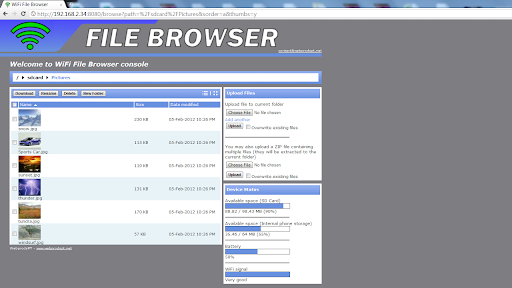


Download + Upload files to your mobile device using your PC web browser and WiFi
-- No more USB cables! WiFi File Browser allows you to download and upload files to your mobile device by using your favourite web browser without the need of a USB cable. The application main focus is to deliver high speed file transfer to users. ☆Many user reviews state that this is the fastest WiFi file transfer application☆ Free version included features: ✔ Download and upload multiple files at the same time without any size limits (bulk download and upload) ✔ Upload compressed ZIP files that are decompressed on the device maintaining the original folder structure ✔ Data transfer statistics (Current session only in Free version) ✔ Browse your mobile device in both Details and Thumbnails view ✔ Open known file types directly in web browser (images, PDF, documents, spreadsheets, etc.) ✔ Manage your SD Card, Battery Level and WiFi signal strength ✔ Runs as a Background Service ✔ Non-english characters full support ✔ Supports all major ZIP applications (7-Zip included) Pro version included features: ✔ Hide files and folders from computer WiFi browser access ✔ Search files and folders from computer WiFi browser access ✔ Set a password to protect unauthorized access when your device is in a public WiFi network ✔ Home screen widget to start/stop the service ✔ Overall data transfer statistics ✔ No ads ☆Purchasing the Pro version is also a way to donate and support continuous application development and improvement☆ Tested with: - Internet Explorer 6+ - Mozilla Firefox - Google Chrome - Safari - Opera
14 years on Google Play
This app isn't currently appearing in any tracked top charts.