
ガソリン代 記録帳 給油量 走行距離 燃費 車の管理
Updated Aug 29, 2026 · v26.8.129


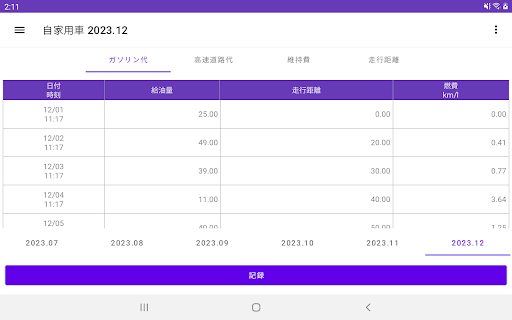
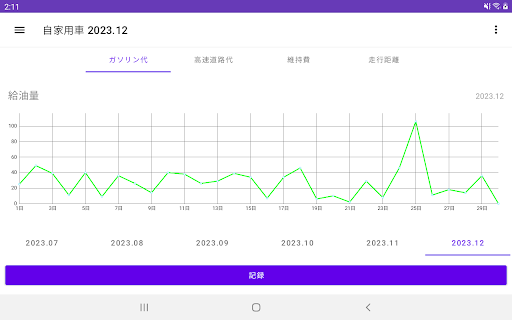


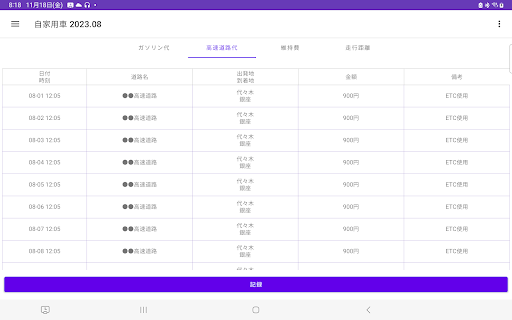


It is an application for recording gasoline cost, refueling amount, mileage, labor cost, parts cost, vehicle inspection fee, parking fee, and bicycle parking fee. Calculate the fuel consumption and display the graph. For managing cars and motorcycles.
petrol cost record Record of refueling amount Record of cumulative mileage Calculate fuel consumption. You can see the graph above. Up to 6 cars can be added and recorded. Record highway tolls/tolls. ▼Procedure for recording gasoline costs 1. Tap the "Record" button at the bottom of the screen. 2. Tap the gas cost. 3. Select the year and month. 4. Select the time. 5.Enter the fuel amount/price/total mileage. 6.Enter SS name/Gas station/Remarks. 5. Tap OK on the confirmation screen. ▼Procedure for recording highway/toll road charges 1. Tap the "Record" button at the bottom of the screen. 2. Tap the highway/toll road charges. 3. Select the date. 4. Select the time. 5.Enter the fare/road name/departure point/arrival point/remarks. 6. Tap OK on the confirmation screen. ▼ Delete and edit the recorded gasoline fee/highway/toll road fee 1.Tap the table. 2. Tap the item you want to edit/delete. ▼Check graphs/tables for the previous month/previous year If you scroll/swipe horizontally on the screen with the graph, You can check graphs and tables for the previous month/last year. ▼ Up to 6 units can be managed separately. If you display the sidebar on the left (swipe from the left) and tap "Add new", you can register a new different car name. When you add a new car, the name will be added to the sidebar, so you can register different cars separately by tapping the name. ▼ Record maintenance costs Press the [Maintenance Cost] button to move to the maintenance cost screen. You can record it by pressing the three buttons of [Maintenance] [Insurance] [Tax] at the bottom. The following items can be recorded. ・Wage ·Parts fee ・Vehicle inspection fee ・Parking fee ・Bicycle parking fee ・Compulsory automobile liability insurance premium ・Voluntary premium ·consumption tax ・Automobile tax ・Weight tax ▼Transfer of model change data In the menu on the upper right, there is "Transfer data from model change". Tap "Transfer model change data" to display the screen for selecting the following. 1. Create a file (create a backup file for model change *only if there is data) 2. Restore (restore data from backup file) [Example procedure] ・Implement the following 1 and 2 on the model you have been using 1. Create a backup file from "Transfer model change data" 2. Select the application "Gmail" in "Send" and send an email to yourself ・ Carry out the following 3 to 5 on the new model. 3. Download backup files in Gmail 4. Tap "Restore" from "Transfer data from model change" 5. Tap the backup file you want to restore (it will show as processing for a few seconds) [feature] Displays total values recorded on a daily basis and aggregated on a monthly basis Show graph [Recommended for these people! ] People who want to manage gasoline costs for free People who want to check the gasoline price with a line graph People who want to check the amount of refueling with a line graph People who want to check the cumulative mileage on a line graph People who want to check the gasoline price on the table People who want to check the amount of refueling in a table People who want to check the cumulative mileage in a table People who have never managed their gasoline bills before People who are concerned about using too much gasoline People who want to manage their annual gasoline bills People who want to manage gasoline costs for multiple cars and motorcycles
This app isn't currently appearing in any tracked top charts.