
Battery Alarm PRO
Updated Jun 6, 2026 · v130


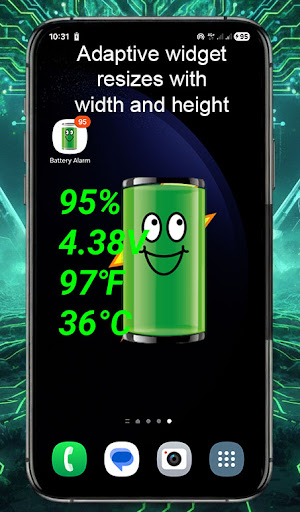


Full and low battery warning, Voice alert in 31 languages, Battery Widget
Before installing the PRO version of the battery, try to make sure that it is compatible with your mobile device with the free version: https://play.google.com/store/apps/details?id=simple.batttery.alarm Try the app for 10 days! If you are not satisfied we will refund the money. Do not hesitate to contact us for any question. smart.silver.droid@gmail.com PRO version supports: * Voice alert in multiple languages * Alarm delay from 5 seconds to 12 hours * Widget * Alert sound selection * Hide icon from notification bar * Male / Female warning voice Supported languages (Voice alert and text): "English", "čeština","dansk", "Deutsch", "español", "français", "Indonesia", "italiano", "magyar", "Nederlands", "polski", "português", "română", "slovenčina", "svenska", "srpski", "Suomi","Türkçe","български", "русский", "Українська", "Ελληνικά", "Tiếng việt", "日本語", "中文", "한국어", "ไทย", "عربي", "فارسی","עִברִית", "हिन्दी" This application does not use Internet, GSM, GPS, Wifi. Battery consumption is minimal !!! On Xioami, Redmi ... : https://www.batteryalarm.app/xiaomi/ When you open the recent apps palette, press and hold the app until a menu appears and you can click the lock. And turn off battery optimization for the battery app. On Huawei: https://www.batteryalarm.app/huawei/ Lock the app on Huawei phones in recently used apps. When you open the recent apps palette, drag the app down (it will be locked) OnePlus users: Look for the "Battery" app in "Settings", then click "Advanced", then "Optimize battery", just check the "Do not optimize" checkbox. OnePlus prevents application functionality by default (to save energy). See websites: https://www.batteryalarm.app/battery/ On the upper slider you set the warning for the minimum battery and the lower one for the maximum battery warning. If you want to turn off the warning, set the slider to ZERO 0 With the Battery alarm application, you can check the status of your battery. All data is obtained from your phone (temperature, current, battery status, etc ...) percentage of battery charge, battery health, current battery temperature, current battery voltage. Check the battery consumption from the Battery Alarm app by clicking the Battery Usage button (First button bottom left). Here you can see which applications have the highest battery consumption.One of the biggest consumers of the battery is the screen, so mobile devices with a larger screen also have larger batteries (and they also have more space for the battery) Regards Vujacic Zoran Belgrade, Serbia smart.silver.droid@gmail.com
6 years on Google Play
This app isn't currently appearing in any tracked top charts.