
Tracer! Lightbox tracing app
Updated Jan 17, 2026 · vVARY

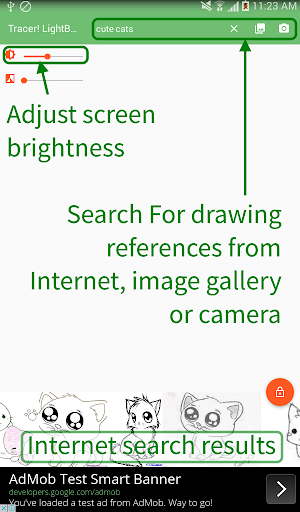


Lightbox and tracing utility for drawing and illustration with built-in search
Tracer! Lightbox tracing app is an integrated tracing app for drawing and illustrating. This app is meant to be used with a physical paper for stencilling and drawing. you just need to select a template picture, then place a tracing paper over it and begin tracing. The default app is a white screen with a brightness control setting. Place your reference picture over the device and begin tracing. Great for tracing drawings and fonts, making stencils, colouring sheets, connect-the-dot's puzzles, etc. You use the app to search for image references from the internet (using keywords or URL links), or an image from the device storage, or take a photo from the camera. Then place a tracing paper over the image and begin copying. There is a lock button which will maximize the drawing space, and prevent the device from sleeping. It's really great for making stencils and to practice drawing with. Features include: - - a handy color adjust to change the gray-scale of the picture for better tracing contrasts. - pan, rotate, zoom the drawing references. - button to toggle rotate on and off - buttons to save and share the drawing references for the future. The app is suitable for artists, students as well as casual users including retirees to do art and craft. There is a wide range of uses for Tracer! app including: - - traditional cell art animation and tracing - calligraphy and font tracing (e.g. to transfer calligraphic fonts and swirl patterns onto posters and paintings) - making stencils (e.g. for Halloween pumpkin carving; graffiti and spray painting art; Christmas snow stencils; cake decorating stencils) - tracing tattoo designs and patterns - base template (e.g. underlay basic perspectives for drawing architectural structures like buildings; underlay simple shapes to draw more complicated art pieces)
10 years on Google Play
This app isn't currently appearing in any tracked top charts.