
VMX Serial Remote for V-Mixer
Updated Sep 30, 2025 · v1.17



Control a Roland V-Mixer Mixing Desk via Wifi or Bluetooth
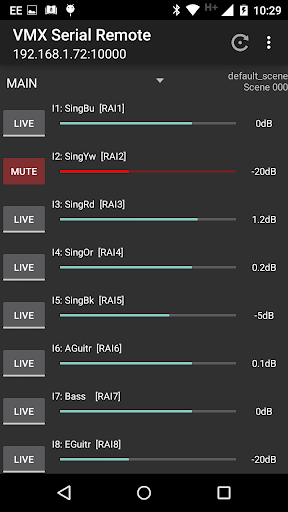
An application to control a Roland V-Mixer Mixing Desk (M-300, M-400 and M-480). This app connects to the Mixer's RS232 port through an inexpensive RS232 Bluetooth Adaptor or a PC/RaspberryPI running a free small background program (VMXProxy - https://github.com/JamesCC/VMXProxyPy). Bluetooth is simplest to set-up but has range limitations. WiFi has much better range and allows multiple users access. Roland offers an iPad App to control the mixer, but it uses the USB port, which prevents USB recording, and it is also 1:1, allowing only one user to alter the mixer settings. This app runs on Android (phones or tablets), allowing multiple users to control feeds (e.g., Musicians controlling their own monitor mixes), and features a considerably more straightforward user interface. VMX Serial Remote is not endorsed by Roland, and is not an official Roland product. It was written by a Sound Technician looking to solve a problem and is provided free of charge. Using a PC and the VMX Proxy script (freeware, available at the listed website), you can simulate a mixer, allowing you to evaluate the application before investing in any connection hardware. Features... - Automatic Synchronisation to the Mixer (poll status every 10 seconds) - Quickly Set/Clear MUTE buttons, Adjust Fader levels - Select which inputs are listed - Display MUTE status, Fader values, Channel names, numbers, and connections - Can connect via Bluetooth (using RS232 adapter) - Can connect via WiFi through free VMXProxy Windows/Linux application (autorun with no user interaction required) - Multiple connections to the Mixer, each with potentially different access rights - Musicians can control their own Monitor Feeds When selecting a Channel, you can adjust... - AUX Send Settings (guarded to prevent accidental adjustment) - Enable/disable of +48v Phantom Power (guarded by lock) - Gain Value, Pad Setting (guarded by lock) - enable/disable of EQ and Phase (guarded by lock) See the website for usage information and instructions on getting set up.
13 years on Google Play
This app isn't currently appearing in any tracked top charts.