
ALPINIST Moon Phase - GMT
Updated Oct 29, 2025 · vVARY


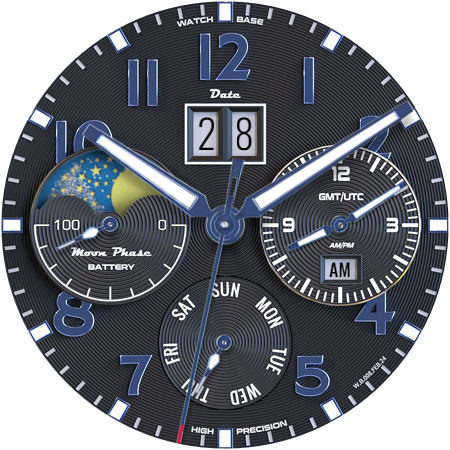


Embark on an elegant adventure with our NEW classic moon phase GMT watch face!
Our new Alpinist Moon Phase - GMT watch face sets new standards for quality and realism. With its classic, clean, and incredibly easy-to-read design, along with a beautiful dial layout, this is a must-have for every Wear OS watch owner! NOTE: Please read the how to section and installation section and check out the images !!! ⓘ Features: - Realistic design. - MOON PHASES! - Classic timeless look and feel. - 10 different main dial color themes. - 5 different MAIN hands colors. - 6 different GMT hands colors. - 6 different INDICATOR hands colors. - Date. - Battery indicator. - Day of week indicator. - Always On Display. - Very beautiful designs! ⓘ How to: - To customize your watch face, touch and hold on the screen, then tap on customize. ⓘ Don't miss out our top REALISTIC watch faces: LUNA BENEDICTA - https://play.google.com/store/apps/details?id=wb.luna.benedicta Harmony GT Premium - https://play.google.com/store/apps/details?id=wb.harmony.gt Classic GMT President - https://play.google.com/store/apps/details?id=wb.classic.gmt VOYAGER WorldTimer - https://play.google.com/store/apps/details?id=wb.voyager.automatic Analog Master - https://play.google.com/store/apps/details?id=wb.analog.master ⓘ Installation How to install: https://watchbase.store/static/ai/ After installation: https://watchbase.store/static/ai/ai.html * Luna Benedicta watch face shown in "How to install" and "After installation". The same installation process is valid for all of our watch faces. If you have any issues installing the watch face, please note that we have no control over the installation process or any other Google Play / Watch processes. The most common issue that people face is after they buy the watch face and install it, they can't see/find it. In order to apply the watch face after you install it, touch and hold on the main screen (your current watch face) the swipe left to look for it. If you can't see it, tap on the " + " sign at the end (add a watch face) and find our watch face there. We use a companion app for the phone to make the installation process easier. If you buy our watch face, tap on the install button (on the phone app) you must check your watch.. a screen will appear with the watch face.. tap install again and wait for the installation to finish. If you already bought the watch face and it still asks you to buy it again on the watch, don't worry you will not be charged twice. This is a common synchronization issue, just wait a little or try to restart your watch. Another solution for installing the watch face is to try to install it from a browser, logged with your account (google play account that you use on the watch). ⓘ Note: If you encounter any issues during installation, please refer to our comprehensive guide or contact our support team for assistance. We're here to ensure your experience with our watch faces is seamless and enjoyable. JOIN WatchBase. Facebook group (General watch faces group): https://www.facebook.com/groups/1170256566402887/ Facebook page: https://www.facebook.com/WatchBase Instagram: https://www.instagram.com/watch.base/ SUBSCRIBE to our YouTube channel: https://www.youtube.com/c/WATCHBASE?sub_confirmation=1 https://www.youtube.com/c/WATCHBASE
2 years on Google Play
This app isn't currently appearing in any tracked top charts.