
Moonphase Day-Date Watch Face
Updated Oct 29, 2025 · vVARY


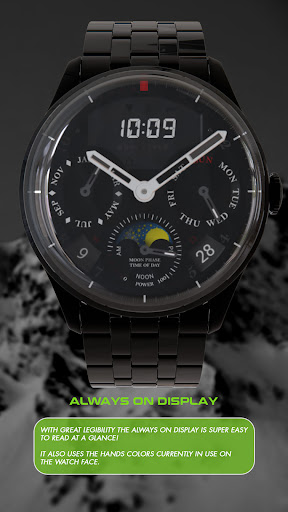


Realistic watch face with great legibility and functionality!
Our NEW ultra realistic watch face has it all and it's ready to be one of the best watch faces for Wear OS. Great legibility, superb graphics, additional complication and clear Always On Display! NOTE: Please read the how to section and installation section !!! ⓘ Features: - Realistic design. - Hybrid analog/digital design. - LCD display with digital time, heart rate and notifications indicator. - AUTO 12/24h mode for digital time. - Additional custom complication. - 3 different colors changeable MAIN hands. - 5 different colors changeable SECONDS hand color. - 4 different colors changeable INDICATOR hand color. - 3 changeable BACKGROUND color/theme. - Black theme, white theme, deep blue theme. - Day and Date. - Moonphase indicator. - Battery indicator. - AM/PM indicator. - AOD (Always on display). ⓘ How to: - To customize your watch face, touch and hold on the screen, then tap on customize. * IMPORTANT - if you enable MFD display you must choose/customize it with the information you want. If you turn off the MFD you must choose "Empty" as a complication option to avoid text/info being displayed over the Moonphase/battery indicator. ⓘ Flashing indicator below digital time: - Below digital time there's an indicator which will flash if you have an unread notification/s. Don't miss out our top REALISTIC watch faces: LUNA BENEDICTA - https://play.google.com/store/apps/details?id=wb.luna.benedicta ILLUMINATOR Digital - https://play.google.com/store/apps/details?id=wb.illuminator.digital VOYAGER WorldTimer - https://play.google.com/store/apps/details?id=wb.voyager.automatic ⓘ Installation How to install: https://watchbase.store/static/ai/ After installation: https://watchbase.store/static/ai/ai.html * Luna Benedicta watch face shown in "How to install" and "After installation". The same installation process is valid for all of our watch faces. If you have any issues installing the watch face, please note that we have no control over the installation process or any other Google Play / Watch processes. The most common issue that people face is after they buy the watch face and install it, they can't see/find it. In order to apply the watch face after you install it, touch and hold on the main screen (your current watch face) the swipe left to look for it. If you can't see it, tap on the " + " sign at the end (add a watch face) and find our watch face there. We use a companion app for the phone to make the installation process easier. If you buy our watch face, tap on the install button (on the phone app) you must check your watch.. a screen will appear with the watch face.. tap install again and wait for the installation to finish. If you already bought the watch face and it still asks you to buy it again on the watch, don't worry you will not be charged twice. This is a common synchronization issue, just wait a little or try to restart your watch. Another solution for installing the watch face is to try to install it from a browser, logged with your account (google play account that you use on the watch). JOIN WatchBase. Facebook group (General watch faces group): https://www.facebook.com/groups/1170256566402887/ Facebook page: https://www.facebook.com/WatchBase Instagram: https://www.instagram.com/watch.base/ SUBSCRIBE to our YouTube channel: https://www.youtube.com/c/WATCHBASE?sub_confirmation=1 https://www.youtube.com/c/WATCHBASE
2 years on Google Play
This app isn't currently appearing in any tracked top charts.